# How to Rank in Google's AI Overviews (2026 Guide)
Most AI Overview advice contradicts Google's guidance. Here's what Google says works and what doesn't, so you can optimize and rank in AI Overviews.
**Published:** September 25, 2026
**Author:** Siew Ann Tan & Connor Lahey
---
In May 2026, Google published explicit guidance on how to rank in Google AI Overviews. The problem is that most online advice contradicts it.
Rather than add to the noise, we've put together this guide to optimizing your pages for AI Overviews, based on what Google says will help.
Key takeaways:
- To rank in AI Overviews, optimize for queries that show them. These queries are typically questions seeking information.
- AI Overview citations often come from the top 10 organic results for queries seeking definitions, but they often don't for queries seeking advice.
- Google's guidance for ranking in AI Overviews includes creating unique, non-commodity content and allowing Google to index it. Having an llms.txt file and adding schema markup also aren't necessary.
- Help Google extract your content for AI Overviews by making your sections self-contained and answering a section's heading in the first sentence below it.
- Google Search Console tells you which pages appear in AI Overviews and other Google Search generative AI features, but not the queries causing these appearances.
## Which searches show an AI Overview?
Google doesn't show AI Overviews on every search. They're more common for informational queries, while navigational and transactional queries typically don't trigger them. The type of informational query also matters because AI Overviews behave differently depending on what the searcher is looking for.
For how-to questions that seek advice, AI Overviews often cite sources that don't rank in the top 10 organic results. For questions that seek definitions, they lean on canonical pages that already rank.
The table provides details on each query type and its typical AI Overview behavior:
| Query type | User intent | Examples of query | Typical AI Overview behavior |
| :---- | :---- | :---- | :---- |
| Informational: Questions that seek advice | The user wants information on whether or how they should do something | "How to clean paint off floor"
"Should I learn french or german" | AI Overview appears, citing sources that don't rank in the top 10 organic results |
| Informational: Questions that seek a definition | The user wants information on a concept's meaning | "What is a hat trick in football"
"Meaning of paradox" | AI Overview appears, citing sources ranking in the top 10 organic results |
| Navigational | The user wants to go to a certain website or page | "Youtube"
"Chatgpt" | AI Overview doesn't appear |
| Transactional | The user wants to take a certain action | "Buy samsung s25"
"Create linkedin account" | AI Overview doesn't appear |
Before optimizing pages to rank in AI Overviews for your target queries, Google them to confirm that they do show an AI Overview. Coverage shifts over time, so optimizing for queries that used to trigger an Overview but no longer do is a waste of effort.
## What Google says about ranking in AI Overviews
Google publishes explicit guidance on ranking in AI Overviews. Its [generative AI optimization](https://developers.google.com/search/docs/fundamentals/ai-optimization-guide) guide, last updated July 10, 2026, tells site owners to create non-commodity content with a genuine, unique point of view, keep pages crawlable, and organize content to help readers follow it. The guide also flags several popular tactics as unnecessary.
Google recommends taking steps like these to rank in AI Overviews:
- **Produce unique, non-commodity content:** Create content with perspectives readers won't find elsewhere, drawing on your brand's expertise and experience.
- **Implement clear technical website structure:** Check that you've allowed Google's search crawler to crawl your site and that Google has indexed your pages. You should also have enabled the Google Search Console setting that lets Google include your site's links and content in Search generative AI features.
- **Organize your content:** Use heading tags to indicate your content's structure, which helps readers and Google understand its hierarchy.
- **Add relevant high-quality images and videos:** Google may show these media as-is within AI Overviews, representing your brand exactly as you intend. Media also provides an extra route into AI Overviews, on top of citation links you earn when Google draws on your website text to synthesize AI Overview answers.
- **Create Merchant Center feeds and a Google Business Profile:** These give Google information about your products and local business, which it may show in AI Overviews when relevant.
Google has also addressed questions people often have about Google AI Overview optimization:
| Tactic | Does it help you appear in AI Overviews? | Google's position |
| :---- | :---- | :---- |
| llms.txt file | No | Google Search ignores llms.txt files, so they neither help nor harm your visibility |
| Schema markup | Not required | No special markup is needed for generative AI search, but structured data still helps with rich results |
| "Chunking" content or writing in an AI-friendly style | No | Google can understand multiple topics on a page and show the relevant piece to users |
### Does an llms.txt file help you appear in AI Overviews?
No, having an llms.txt file won't help you appear in AI Overviews. Google doesn't refer to this file when deciding whether to feature you on search engine results pages (SERPs), including in AI Overviews. You can still have an llms.txt file if you need one.
[Google says](https://developers.google.com/search/docs/fundamentals/ai-optimization-guide#mythbusting):
> "It's completely fine if you decide to create and maintain LLMS.txt files (or other similar files) for other services or systems that use these files. Doing so will neither harm nor help your site's visibility or rankings in Google Search, as Google Search ignores them."
### Is schema markup required for AI Overviews?
No, schema markup isn't required to appear in AI Overviews. Adding schema markup still helps with improving visibility on other Google Search features, so there's no need to remove it from your site if you're already using it.
[Google says](https://developers.google.com/search/docs/fundamentals/ai-optimization-guide#mythbusting):
> "Structured data isn't required for generative AI search, and there's no special schema.org markup you need to add. However, it's a good idea to continue using it as part of your overall SEO strategy, as it helps with being eligible for rich results on Google Search."
### Does "chunking" content or writing in an AI-friendly style help?
No, "chunking" content or writing in an AI-friendly style doesn't help you appear in AI Overviews. "Chunking" means to split your content into smaller segments, which helps readers follow the discussion. People also believe "chunking" can help Google understand your content better.
[Google says](https://developers.google.com/search/docs/fundamentals/ai-optimization-guide#mythbusting):
> "Google systems are able to understand the nuance of multiple topics on a page and show the relevant piece to users."
Likewise, there's no need to write in a way you think will be easier for AI engines to understand or reference when answering queries. This includes tactics like writing multiple pages to target AI Overviews for queries involving synonyms of a certain word.
Google views the mass-creation of pages that cover the same topic to influence rankings as a violation of its scaled content abuse spam policy. Consequently, it may bar your content from appearing in AI Overviews and other Google Search features.
## Do AI Overview citations come from the top 10 organic results?
AI Overview citations do come from the top 10 organic results, but far less than commonly claimed. Across three US SERPs we spot-checked in July and August 2026, 12 of 24 AI Overview citations were to a page URL also ranking in the top 10 for that query. On the two how-to queries, only seven of 18 AI Overview citations did.
These are URL-level figures, which are more precise than domain-level figures we've seen elsewhere. That's because a page from a domain can rank in the top 10 for a query while the AI Overview cites a different page from the same domain, which can inflate domain-level citation counts.
Case in point: the same three SERPs we checked produced 14 of 24 domain-level matches rather than 12 of 24, while the two how-to queries produced nine of 18 matches instead of seven of 18.
As mentioned earlier, AI Overviews cite the top 10 organic results to varying extents depending on the query type. In our spot checks, the more a query asked for advice instead of a definition, the less likely its AI Overview was to cite a top-10 result.
During our spot checks, seven of 18 (or 39% of) citations for how-to queries matched a top-10 URL. For definitional queries, five of six (or 83%) matched a top-10 URL, as Google leaned on canonical sources, like its own documentation and Wikipedia, to improve its answers' accuracy.
You can run this spot check yourself. Google your target keywords to see which page URLs Google cites in its AI Overviews. Then, compare these URLs against those ranking in the top 10. Also, evaluate how citation counts change for different query types.
Securing a top-10 ranking isn't necessary or sufficient for getting citations, and tracking your rankings alone won't tell you whether Google is citing you in AI Overviews.
## How should you structure a page for AI Overviews?
Give the answer in the first sentence beneath each heading, then provide further explanation. AI Overviews retrieve passages, not whole pages, so each section needs to make sense when read alone. Use headings that are phrased the way people ask questions, and keep evidence close to the claim it supports.
Do this, and Google is more likely to lift your text intact when synthesizing AI Overview answers.
### Put the answer in the first sentence under every heading
Answer the question posed by the heading directly, skipping any preamble.
For example, we've addressed our heading's question of "How should you structure a page for AI Overviews?" by stating the answer ("Give the answer in the first sentence beneath each heading, then provide further explanation") outright.
We didn't start with something like "It's important to structure a page for AI Overviews because…" This information is irrelevant as an answer to the question of how to structure for AI Overviews, as opposed to why this structuring is important.
### Write sections that make sense when read out of context
Each content section should make sense when read on its own, without relying on information from other sections. AI engines retrieve passages rather than entire pages, so each passage needs to be clear enough for these systems to understand and use when generating answers and citations.
Avoid starting paragraphs and sections with pronouns, like "he," or vague references, like "the tool." Instead, restate the subject, like "Tom" and "CarPlay," for clarity.
Don't rely on back-references, either. This is where the reader needs to go back to a previous section to follow what you're talking about now. Recap the relevant point instead.
### Match your headings to how people phrase the question
Use question-shaped headings phrased the way people usually ask about the topic. For example, if people normally ask, "Why is it important to get enough sleep?" use that as the heading instead of, say, "Benefits of getting enough sleep."
Your headings should also be self-contained, making sense when read on their own. To do this, name the entities involved instead of using pronouns. For example, don't write "How to dress like her," where it's unclear who "her" is. If "her" refers to Billie Eilish, write "How to dress like Billie Eilish."
Format your page in ways like these to help Google parse it:
- Use semantically valid HTML to make your pages easier to understand.
- Use H1 to H6 tags for heading text to mark it up as a heading more clearly than styling it as bolded text does.
- Structure genuine list and table content with list and table tags, respectively, so that Google recognizes it correctly.
Follow [Google's guidance](https://developers.google.com/search/docs/fundamentals/ai-optimization-guide#create-valuable-content) about organizing content for readers, and machine-readability will naturally follow.
## Which content signals correlate with AI Overview citations?
Original data, cited sources, genuine points of view, and visible expertise all help your content earn AI Overview citations. Google asks for non-commodity content going beyond common knowledge, and [Princeton University's GEO study](https://collaborate.princeton.edu/en/publications/geo-generative-engine-optimization/) found that pages carrying statistics, quotes, and cited sources earn up to 40% more generative visibility. Page length isn't a factor.
Google uses "[non-commodity content](https://developers.google.com/search/docs/fundamentals/ai-optimization-guide#create-valuable-content)" to describe content that goes beyond information that's widely accepted as true. This content offers original insights and a genuine point of view, often stemming from the writer's research and expertise.
For example, a robot vacuum article titled "Roborock Q7 TF+: features and price" that rehashes information from other websites is generic content. In contrast, an article titled "Roborock Q7 TF+ review: 6 months later", where the writer tested a robot vacuum for six months to share their personal review of it, is non-commodity content.
Adding [E-E-A-T](https://www.searchable.com/blog/e-e-a-t) (experience, expertise, authority, trustworthiness) elements to pages also signals their non-commodity nature. For instance, source content from experts in your field, and name them and their credentials in article bylines. Also, link to these authors' "About" pages, which detail the authors' backgrounds and expertise.
[Content freshness signals](https://www.searchable.com/blog/content-freshness-signals), like visible "Published" and "Last updated" dates on your pages, are key for signaling how recently they were updated and whether their information is accurate and worth citing. Google especially prioritizes citing the latest information for fast-moving topics like news.
Page length doesn't drive citations. A [study of 174,000 pages](https://ahrefs.com/blog/short-vs-long-content-in-ai-overviews/) found that over half of AI Overview citations went to pages below 1,000 words. The value of your content is what earns citations, not its word count.
## How to measure whether you appear in AI Overviews
On June 3, 2026, Google Search Console released a generative AI performance report that shows how often your pages appear in AI Overviews, AI Mode, and Discover's generative features. You can break down this data by page, country, device, and date. This report doesn't show queries, clicks, or click-through rate. So, it tells you that you appeared, but not which queries you appeared for.
### What Search Console's generative AI report shows about AI Overviews
Google Search Console's generative AI report launched on June 3, 2026, and gives you first-party impression data for pages on your site that appeared in AI Overviews, AI Mode, and Discover's generative features. The report also shows impression counts per country, device, and day.
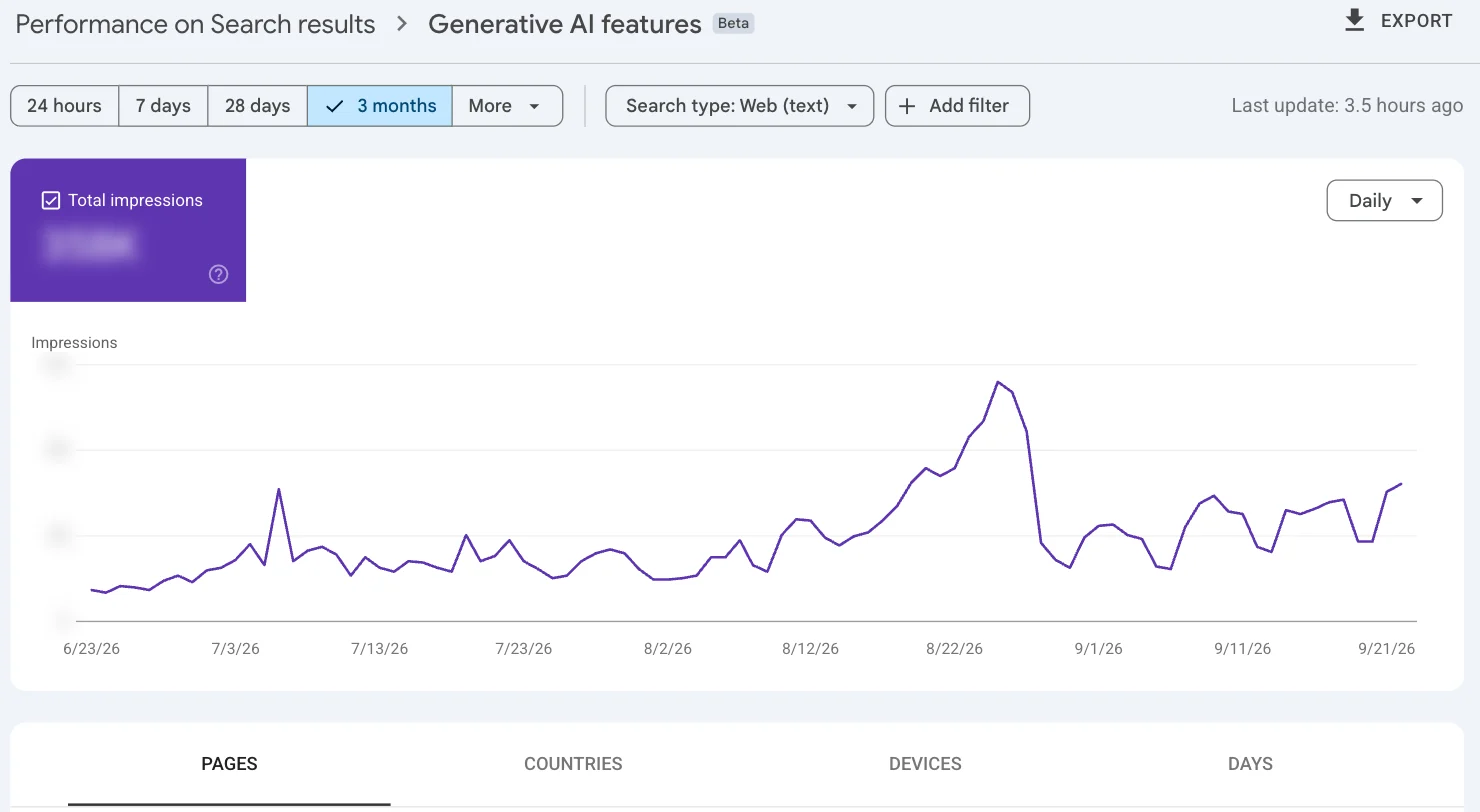
Accessing Google Search Console's generative AI report is free. To view it, go to your property in Google Search Console. Then, click the dropdown icon next to "Search results" in the left sidebar > **"Generative AI."**
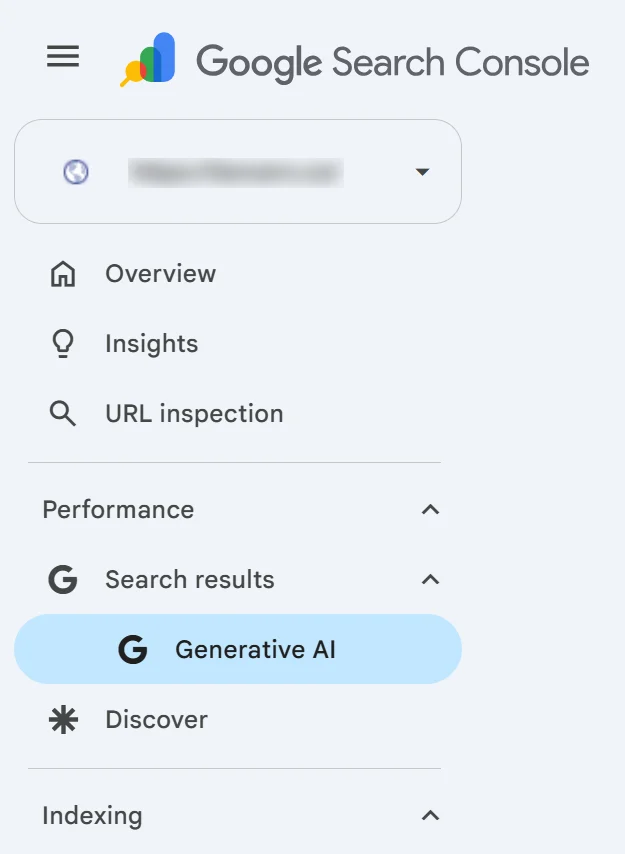
If you don't see the report in Google Search Console, make sure you haven't excluded your site from Google's Search generative AI features. The report doesn't appear for websites that receive too few impressions from these features.
Google is progressively rolling out the report, so check back later if you don't see it.
### What Search Console doesn't tell you about AI Overviews
Google Search Console doesn't tell you the queries that led to AI Overview appearances and clicks from these appearances to your website. It also doesn't share click-through rates.
This means that while you'll learn that certain pages appeared in AI Overviews, you won't know the queries it appeared for. You also can't view the content of the AI Overview, including how it portrayed you and who else it mentioned.
Searchable's AI visibility tracking covers these gaps. It shows prompt-level visibility into your [citations and mentions](https://www.searchable.com/features/aeo-insights/mentions-citations), AI responses to these prompts, plus which competitors appear alongside you.
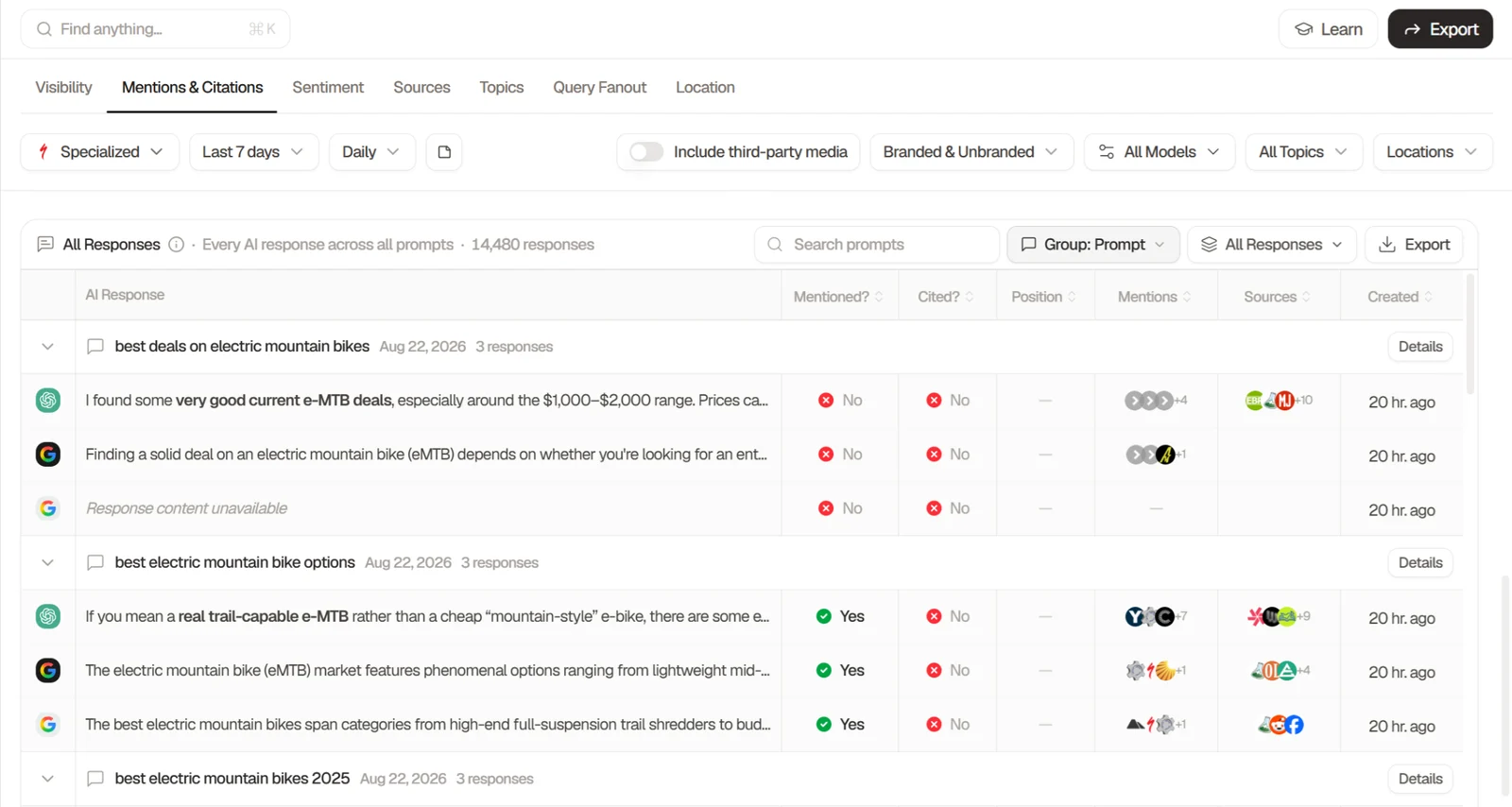
Searchable also tracks more than AI Overview visibility. Its coverage extends to nine AI engines, with ChatGPT, AI Overview, and Perplexity tracking included by default. Other engines, like Claude and Copilot, are available as paid add-ons.
Google Search Console works for knowing whether you appear in AI Overviews. To see what you're appearing for and who you're competing against, use Searchable.
Claim a [free visibility report](https://www.searchable.com/free-visibility-report) for a preview of the intel you'll get when you track visibility with Searchable.
## Where to start if you aren't appearing in AI Overviews
Start by finding which of your target queries show an AI Overview. There's no point trying to rank in AI Overviews for queries that don't have one. Then, check Google Search Console's generative AI report to see which of your pages already appear in Google Search's generative AI features. Finally, fix the answer structure on your highest-intent pages before finding new queries to optimize for.
Here's what acting on each step helps with and how to do it:
1. **Check which target queries show an AI Overview:** Google each query manually, or track them in a prompt tracking tool like Searchable that includes AI Overview coverage. Note which queries return an AI Overview, so you can focus on optimizing your pages for them.
2. **Check which of your pages already appear in Google Search's generative AI features:** The report doesn't indicate if these pages appear in AI Overviews or a different generative AI feature, but you'll still know which pages don't appear in any generative AI feature.
3. **Fix the answer structure of your highest-intent pages:** Map each page's intent to target queries that show an AI Overview. Then, update the page's structure and content for more effective AI extraction. Pay special attention when optimizing pages designed to drive conversions and pages that don't appear in any Google Search generative AI feature.
4. **Find new queries to optimize for Google AI Overviews:** After optimizing for existing queries, find new ones to expand your AI Overview visibility. Conduct prompt research in a tool like Searchable, and then save promising queries you identify for easy future tracking.
Keep the query's type in mind as you apply these steps, as it changes what progress looks like. If you're optimizing for definitional queries, securing top-10 rankings is a good checkpoint on the way to AI Overview appearances. For queries that seek advice, a top-10 ranking isn't always necessary, because you can still appear in the AI Overview without one.
## Frequently asked questions
### How long after publishing can a page appear in an AI Overview?
A page can appear in an AI Overview within days of publication if Google has indexed it and it's eligible to appear in Google Search's generative AI features. For quicker indexing, submit your page through Google Search Console's URL Inspection tool instead of waiting for Google to discover it during its next crawl.
### Can you stop your site from appearing in AI Overviews?
Yes, Google Search Console has a setting for disabling site appearances in AI Overviews. In the platform, click **"Settings"** in the left sidebar > **"Search generative AI"** > **"Exclude my site's links and content from Search generative AI features."** If your site inherits its control setting from a parent property, deselect the **"Inherit control from [parent property]"** checkbox to make the **"Exclude my site's links and content"** setting selectable.
### Do AI Overviews reduce clicks to your site?
They might, if users have no need to visit your site after reading the AI Overview's information. Fewer site clicks doesn't always mean lower revenue, though. You still build visibility and trust that can lead to clicks when users are ready to take action. View our proof of this in our guide to [zero-click optimization](https://www.searchable.com/blog/zero-click-optimisation).
### What's the difference between AI Overviews and Google AI Mode?
AI Overviews provide succinct answers to queries at the top of Google's organic search results. In contrast, [Google AI Mode](https://www.searchable.com/blog/google-ai-mode) lives in a separate Search tab, and it's a conversational interface allowing users to ask follow-up questions for more personalized responses. Google Search Console's generative AI report provides aggregate data on site appearances in both products, plus the generative AI features in Discover.
---
[Back to Blog](https://www.searchable.com/blog) | [Searchable Homepage](https://www.searchable.com)