

The best ChatGPT tracking tools cover all four ChatGPT surfaces (model-only answers, ChatGPT Search, ChatGPT Shopping, and fan-out queries), sample prompts at least daily, and show the sub-queries ChatGPT runs in the background. One ChatGPT response is backed by an average of 1.74 underlying searches, according to Searchable’s measurement across 6.9 million responses, so a single check is one sample rather than a stable result. We scored eight tools on surface coverage, samples per prompt, fan-out query visibility, and price per prompt: Searchable, Rankability, Morningscore, Rankscale, ProRankTracker, Cairrot, Geoptie, and LPagery. Searchable is our top pick because it tracks every ChatGPT surface in one place and helps you act on the results with built-in content and technical optimization tools. Rankscale samples as often as hourly, ProRankTracker is the cheapest per prompt, and Cairrot’s free one-off report suits a quick first check.
The best ChatGPT tracking tools offer comprehensive visibility coverage, sample prompts frequently, reveal the sub-queries ChatGPT runs in the background, and are cost-effective.
In this guide, we reviewed eight tools, testing them where possible, to help you choose the right one for your situation.
Key Takeaways
ChatGPT tracking tools let you track mentions of your brand and citations of your website to assess your visibility in ChatGPT answers.
For comprehensive visibility coverage, track these four ChatGPT surfaces: model-only answers, ChatGPT Search, ChatGPT Shopping, and fan-out queries.
ChatGPT runs an average of 1.74 fan-out queries before providing an answer, according to our measurement across 6.9 million responses.
The best ChatGPT tracking tools sample prompts at least daily to give you more accurate visibility data.
Our top pick for tracking ChatGPT visibility is Searchable, as it helps teams track every ChatGPT surface in one place, and then act on the results with built-in content and technical optimization tools.
What does a ChatGPT rank tracker measure?
A ChatGPT rank tracker sends prompts to ChatGPT on a schedule and records whether its answer mentions your brand and cites your website, plus which competitors appear alongside you.
ChatGPT rank trackers are useful only when they sample each prompt many times rather than once. That’s because ChatGPT personalizes answers and runs its own follow-up searches (such that a single response is one sample instead of a static result for any given prompt).
Mentions and citations are different: A mention is when ChatGPT names a brand in an answer. And, a citation is when ChatGPT links to a website whose information it relied on to generate its answer.
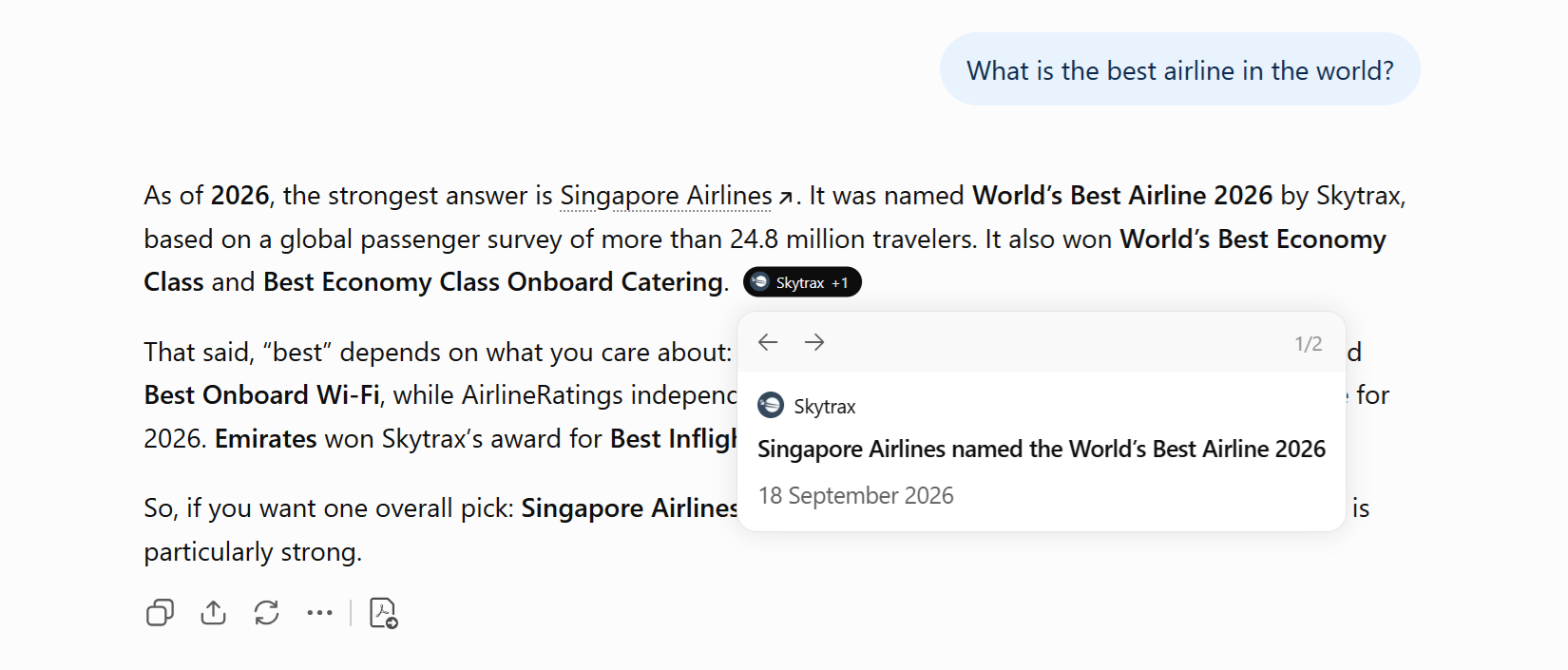
ChatGPT may mention brands without citing their websites, and vice versa. For example, ChatGPT mentions Singapore Airlines in response to the prompt “What is the best airline in the world?” It also cites Skytrax’s website (but not Singapore Airlines’) in support of its answer.
Why does ChatGPT give different answers to the same question?
ChatGPT gives different answers to the same question because it personalizes responses with memory and custom instructions. It also runs its own follow-up searches that vary between chat sessions.
One ChatGPT response is backed by an average of 1.74 underlying searches, according to Searchable’s measurement across 6.9 million responses. So, being mentioned or cited in one ChatGPT answer doesn’t mean this will happen again, even for a similar or identical prompt in the future.
ChatGPT gets its data from four surfaces:
- Answers from its large language model, with no live search.
- ChatGPT Search, where the AI engine retrieves and cites live online pages in its answer.
- ChatGPT Shopping, where the AI engine returns product recommendations.
- Fan-out queries, which are extra sub-queries that ChatGPT runs after receiving a user prompt.
ChatGPT surface
Model-only answers
From the large language model, with no live search
ChatGPT surface
ChatGPT Search
Retrieves and cites live online pages
What the user sees
A ChatGPT answer
Built from any mix of the four surfaces
ChatGPT surface
ChatGPT Shopping
Returns product recommendations
ChatGPT surface
Fan-out queries
Extra sub-queries ChatGPT runs after the prompt
ChatGPT also personalizes its responses based on memory and custom instructions.
Given ChatGPT’s varied information sources and efforts to personalize responses, two users asking the same question can get different answers. To increase measurement accuracy, ChatGPT tracking tools should check prompts not once, but as frequently as possible, and across all four ChatGPT surfaces.
ChatGPT tracking tools should also show the background searches ChatGPT ran to generate its answer, so you can optimize for these sub-queries.
How one ChatGPT prompt becomes several searches
When users enter a prompt, ChatGPT carries out a process called query fan-out. This process splits the prompt into multiple related sub-queries, searches the web for answers to each sub-query, and then combines the best answers for each into one comprehensive answer.
To find ChatGPT’s fan-out queries for a prompt, run the prompt in ChatGPT using the Chrome browser. Once ChatGPT shows you an answer, copy the chat’s conversation ID (the string at the end of the chat URL in your browser’s address bar).

Right-click anywhere in the chat, and then click “Inspect.” When the Chrome DevTools appear, switch to the** “Network”** tab. Then, refresh the chat (by refreshing your browser tab).
Once the chat has reloaded, paste the conversation ID into the “Network” tab’s filter. You’ll see the conversation ID appear in the filter results below. Click it.
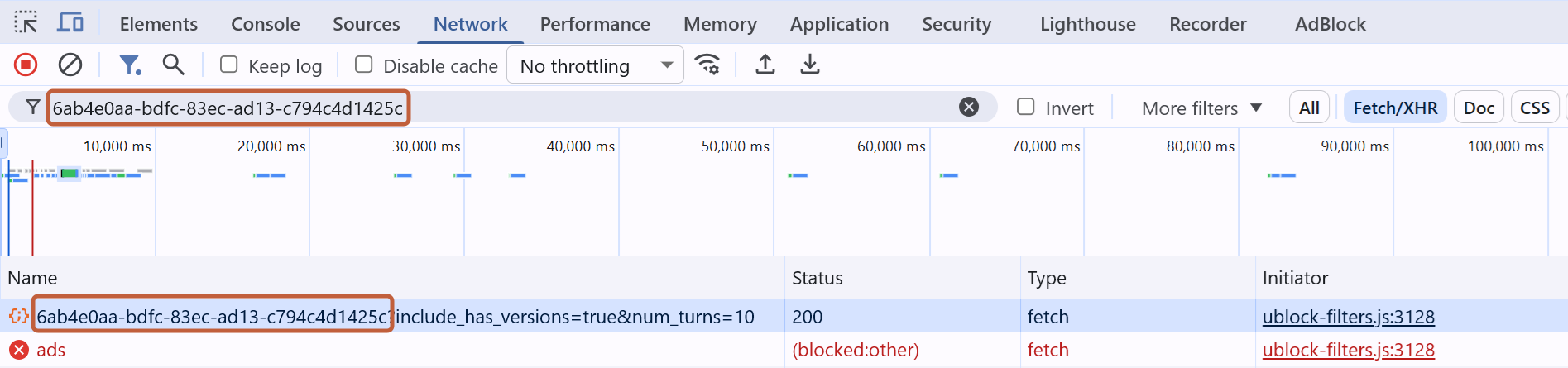
Click the** “Response”** tab. Then, hit Ctrl+F (for Windows) or Cmd+F (for Mac) on your keyboard to open the search bar. Type** “queries”** into it, and you’ll see ChatGPT’s sub-queries.
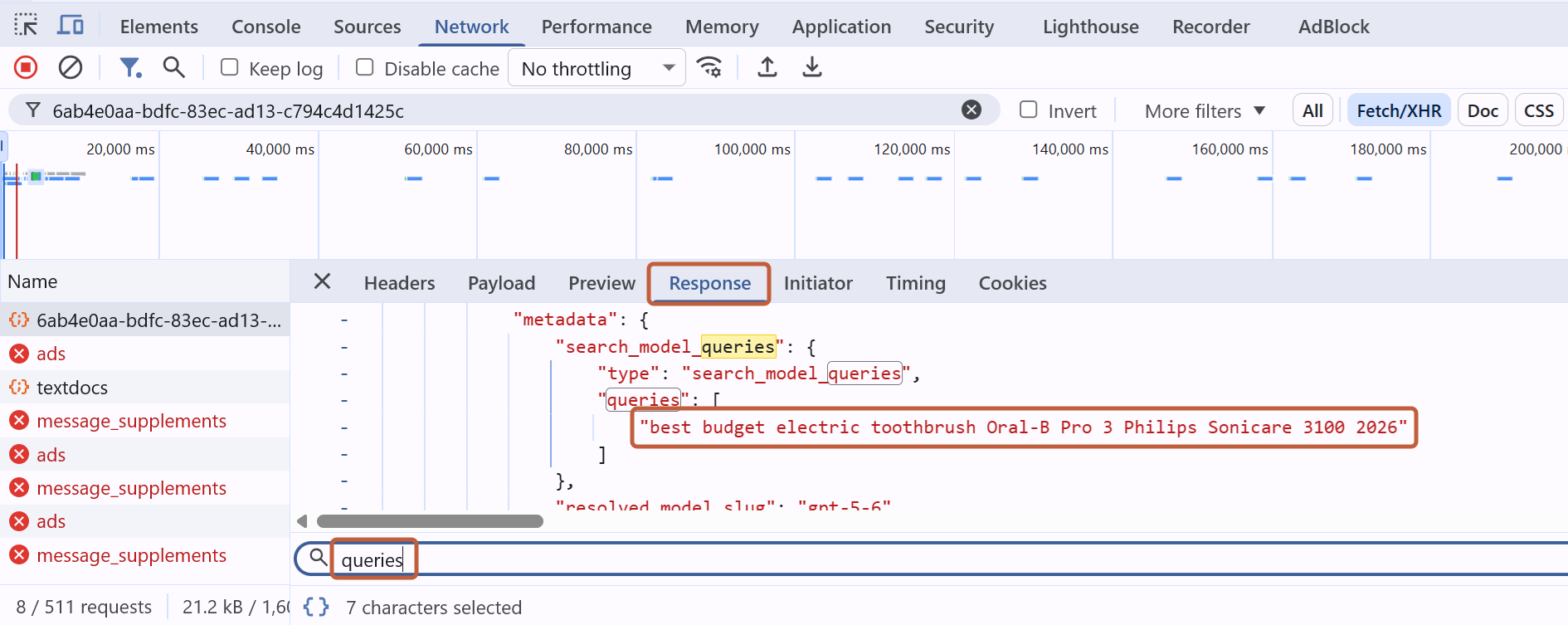
In this example, when I prompted “Best electric toothbrushes on a budget,” it ran one sub-query: “best budget electric toothbrush Oral-B Pro 3 Philips Sonicare 3100 2026.”
Over a stable 28-day window, our pipeline recorded 12,030,112 underlying search queries across 6,902,839 ChatGPT responses, or an average of 1.74 searches for every response.
Across the last two months, the weekly average moved from 1.6 to 1.7, 1.7, 1.9, and 2.3 searches per response. These constantly shifting figures mean that ChatGPT tracking tools that sample prompts too infrequently, or only once, are unlikely to provide accurate visibility data.
Knowing the fan-out queries ChatGPT ran also matters since they often differ from the prompt you’re tracking. If a ChatGPT tracking tool reports that your brand wasn’t mentioned but doesn’t show the fan-out queries behind ChatGPT’s response, you won’t know which queries to target to improve your visibility.
How ChatGPT memory and custom instructions change answers
Memory is a feature that helps ChatGPT remember information about a user so it can give them more relevant answers. ChatGPT’s help article (as of September 2026) lists the following as possible sources for memory:
- Past ChatGPT conversations.
- Memory content saved in the user’s ChatGPT account.
- Custom instructions, which are rules the user wants ChatGPT to consider when responding. Examples of rules are replying in a certain language and providing examples to illustrate points.
- Files in Library, which is a repository of assets the user has created with ChatGPT or uploaded to their ChatGPT account.
- Content from apps the user has connected to their ChatGPT account.
ChatGPT memory changes answers because different users have different characteristics and preferences. For example, if ChatGPT remembers one user as living in New York City and another in Paris, it might recommend restaurants in each of those cities when these users separately ask it for “pizza recommendations near me.”
How we scored these ChatGPT rank tracking tools
We scored eight ChatGPT rank tracking tools on four criteria: surface coverage, how frequently the tool samples each prompt, whether the tool shows the fan-out queries ChatGPT ran, and the tool’s price per prompt per month at the entry-level tier. We fixed these criteria before scoring any tool.
| Criteria | Details |
|---|---|
| Surface coverage | Whether the tool samples model-only answers, ChatGPT Search, ChatGPT Shopping, and fan-out queries. |
| Samples per prompt | How frequently the tool samples each prompt. |
| Sub-query visibility | Whether the tool shows the fan-out queries ChatGPT ran in response to prompts. |
| Price per prompt per month | How much the tool charges for tracking each prompt, based on the tool’s entry-level tier. |
We chose to score eight tools instead of more. This way, we could review each tool against our four criteria and identify a weakness more thoroughly than if we were to evaluate a longer list of tools.
The 8 best ChatGPT rank trackers compared
The eight best ChatGPT rank trackers in 2026 are Searchable, Rankability, Morningscore, Rankscale, ProRankTracker, Cairrot, Geoptie, and LPagery. They differ mostly by how many ChatGPT surfaces they sample and how often they sample prompts, which is what separates usable measurements from single data points.
Here’s a comparison table summarizing these ChatGPT rank tracking tools:
Swipe sideways to see every column.
| Tool | Surfaces covered* | Samples per prompt | Fan-out query visibility | Entry price on monthly billing |
|---|---|---|---|---|
| 1. Searchable | Model-only, ChatGPT Search, ChatGPT Shopping, fan-out queries | 1/day | Yes | $1.25/prompt per model per month |
| 2. Rankability | Model-only, ChatGPT Search, fan-out queries | 1/dayWeekly and monthly sampling also available. | Yes | $0.97/prompt per month |
| 3. Morningscore | Model-only, ChatGPT Search | 1/week | No | $6.90/prompt per month |
| 4. Rankscale | Model-only, ChatGPT Search, ChatGPT Shopping, fan-out queries | 1/hourDaily, weekly, and monthly sampling with optional bi-cadence also available. | Yes | $1.06/prompt per monthAssuming daily sampling |
| 5. ProRankTracker | Model-only, ChatGPT Search | 1/day | No | $0.20/prompt per month |
| 6. Cairrot | Model-only, ChatGPT Search, fan-out queries | UnverifiedCairrot doesn’t publish this information. | Yes | $2.60/prompt per month |
| 7. Geoptie | Model-only, ChatGPT Search | 1/day | UnverifiedGeoptie doesn’t publish this information. | $3.27/prompt per month |
| 8. LPagery | Model-only, ChatGPT Search | 1/day | No | $4.90/keyword per month |






*This column lists ChatGPT surface coverage I could verify through each tool’s public documentation and my own testing. The tools may cover more surfaces than is shown here. Prices are as of October 2026.
The 8 best ChatGPT rank trackers reviewed
Our overview of each of the eight ChatGPT rank trackers below follows the same four criteria established earlier: surface coverage, samples per prompt, fan-out query visibility, and price per prompt at the entry tier. Every entry is based on my September 2026 tests of the tool and reviews of its public pages. Each also names a real limitation, including our own. Prices are current as of October 2026.
1. Searchable
Searchable is an AI visibility platform that helps brands understand and improve how they appear across 11 AI engines, combining visibility tracking, content optimization, and technical optimization in one tool.
Surface coverage. Searchable’s ChatGPT surface coverage is one of the most comprehensive in the market, including all four surfaces of model-only answers, ChatGPT Search, ChatGPT Shopping, and fan-out queries.
When you set up prompts in Searchable, the “AEO Insights” report shows snapshots of ChatGPT’s responses, plus detailed information on the brands mentioned and the websites cited in these answers. You’ll also see lists of the ChatGPT Shopping queries and fan-out queries the AI engine ran after receiving the prompt, if any.
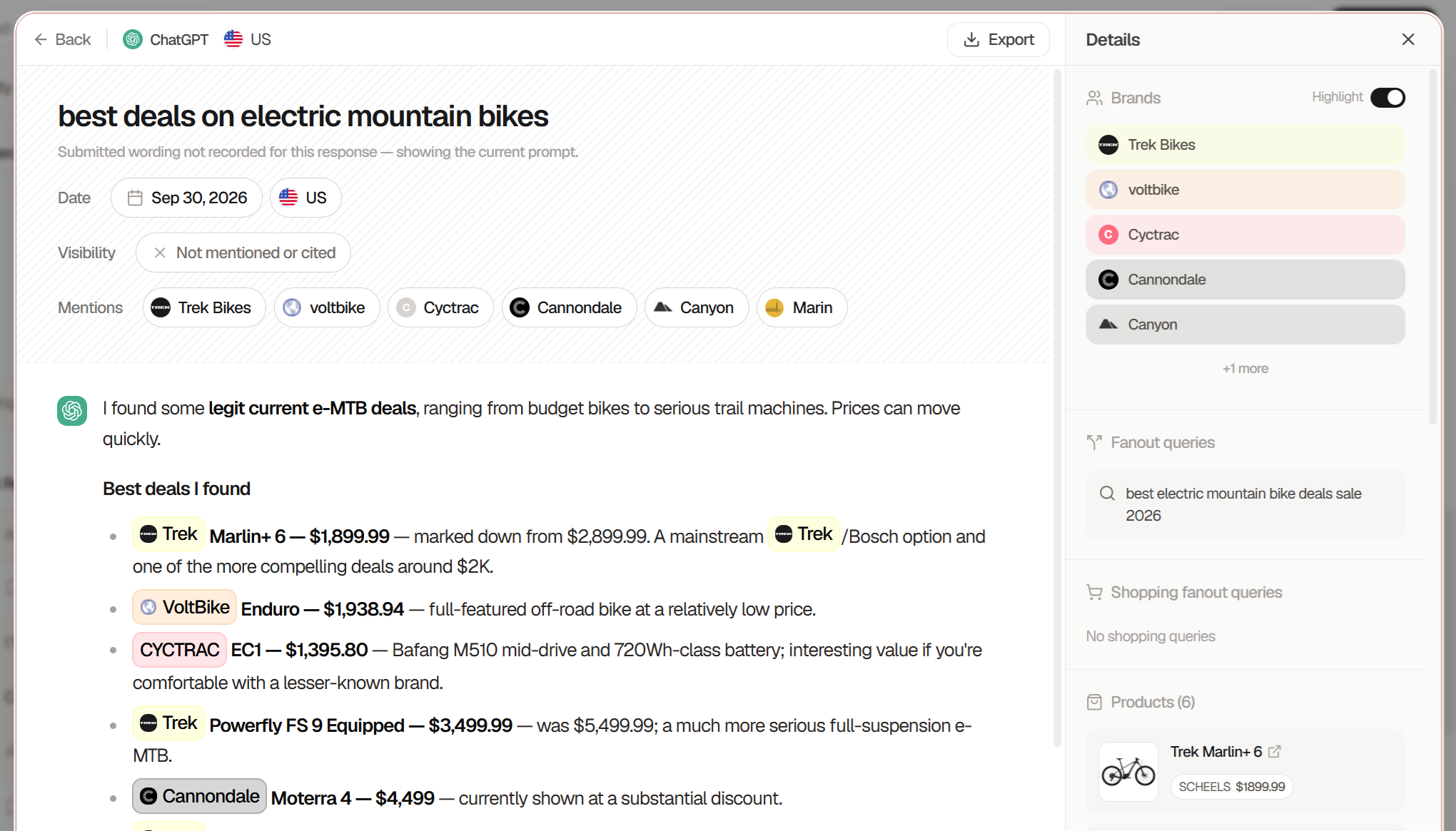
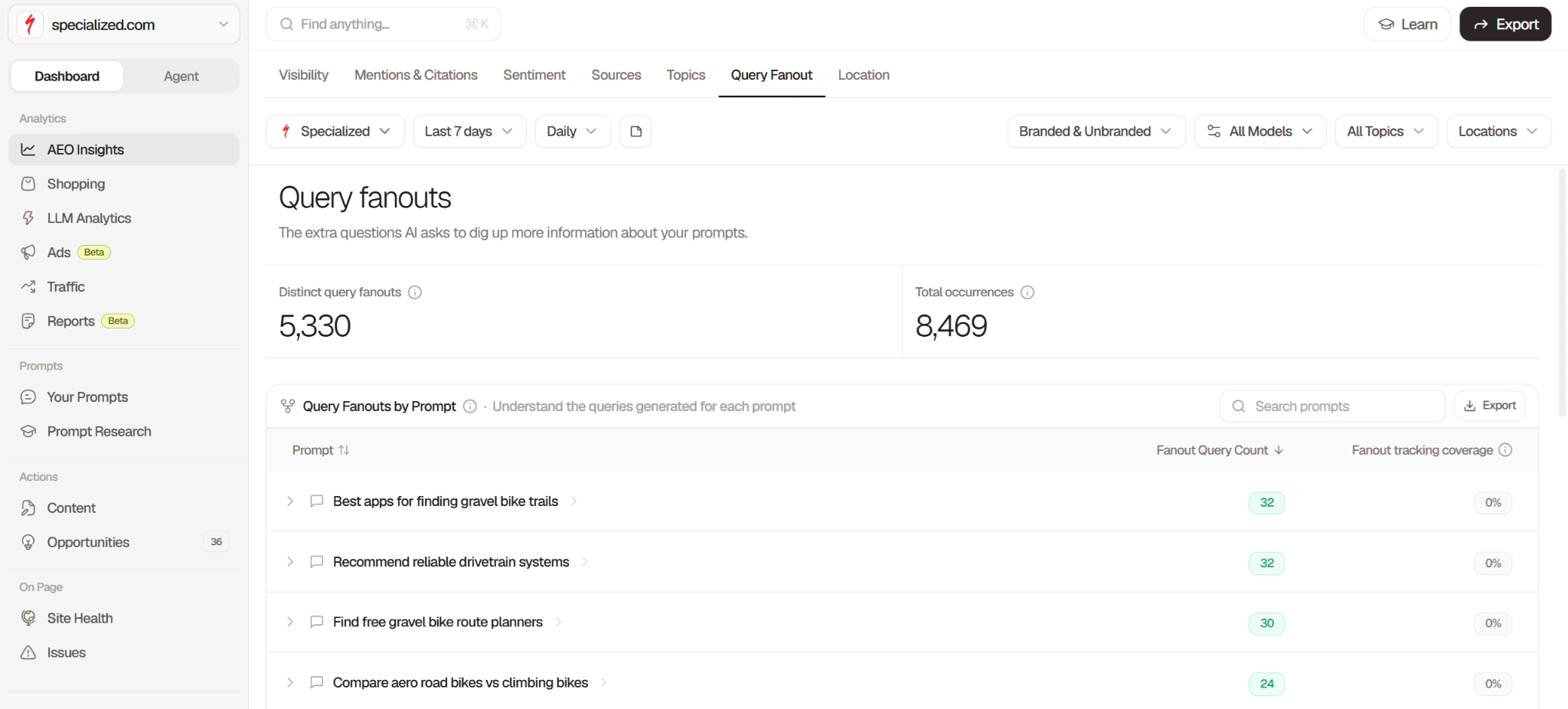
Sub-query visibility. For even more fan-out query data, go to the “AEO Insights” report’s “Query Fanout” tab. Then, use the** “Models”** drop-down menu to filter for ChatGPT data. You’ll see fan-out query counts for each prompt you track in ChatGPT, the brands mentioned in these queries, and the number of mentions.
Searchable’s “Shopping” report shows your visibility for prompts that display ChatGPT Shopping results. Like before, use the** “Models”** drop-down menu to filter for ChatGPT data.
After applying the filter, you’ll see your product share of voice and the competitors that appear alongside you in ChatGPT Shopping results.
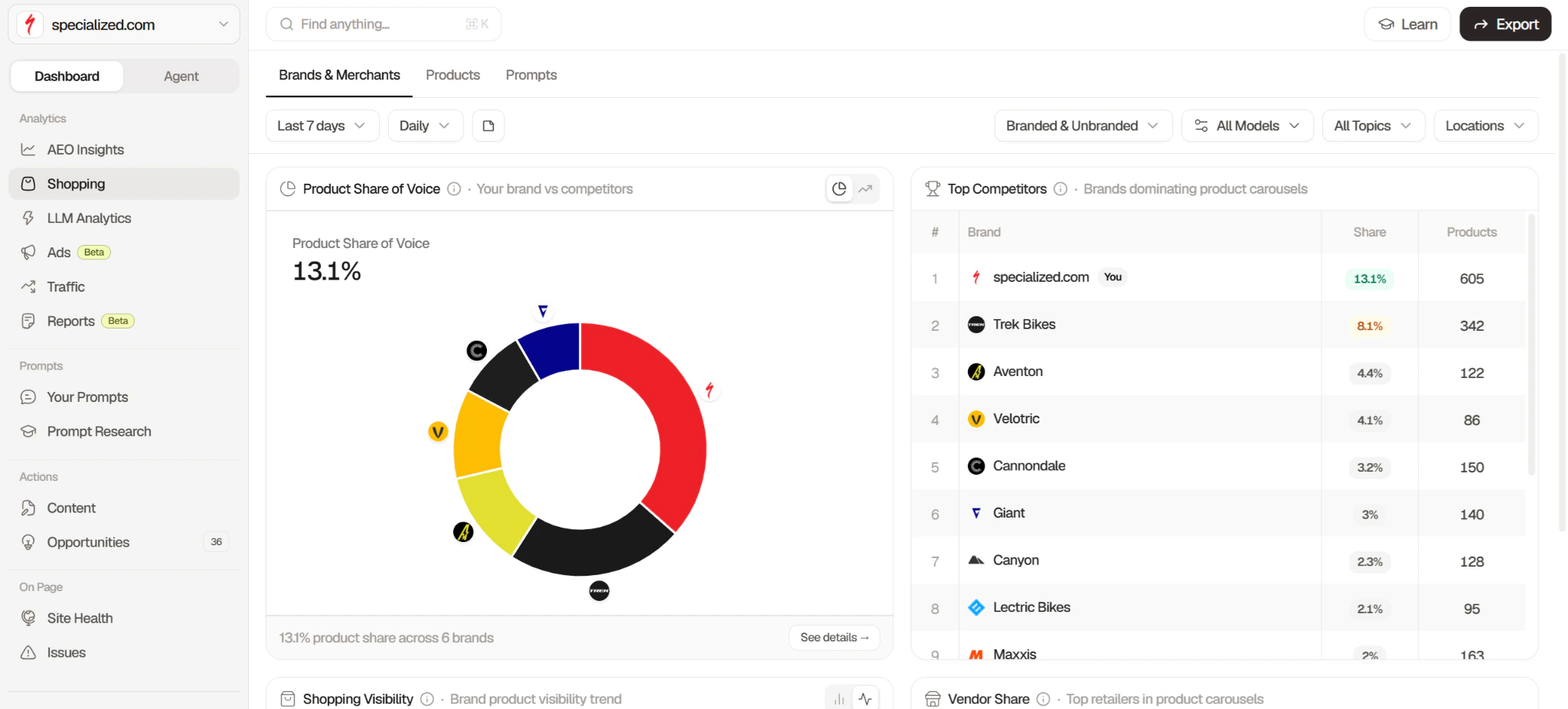
Use the “Shopping Visibility” chart to monitor your visibility in these results over a particular period.
Samples per prompt. Searchable samples prompts daily for higher visibility data accuracy compared to weekly or monthly sampling. Custom sampling frequency is available on the Custom plan.
What Searchable is good at
The extensive range of filters in Searchable’s visibility reports helps you drill down to the data you want to see.
For example, you can filter by branded and unbranded prompts, topics, and specific cities and countries. Alternatively, configure the report’s date range to track visibility over a given period.
Searchable also helps you act on your visibility findings. Its Content Studio generates content optimized for AI search, while its technical optimization tools check your website for technical issues that could be impacting AI visibility.
Where Searchable falls short
Searchable isn’t the cheapest ChatGPT tracking tool. As of September 2026, it charges $1.25 per prompt per model per month on the entry-level plan. This cost can seem high when you consider that some other tools charge less than $1 per prompt. If you need only a monthly check on 10 prompts, there are likely more cost-effective tools for that.
Searchable pricing
As of October 2026, Searchable’s pricing page lists its prices as:
- Pro: $125 per month (or $100 per month billed annually) for 100 prompts per model.
- Scale: $400 per month (or $320 per month billed annually) for 500 prompts per model.
- Enterprise: $999 per month (or $799 per month billed annually) for 1,250 prompts per model.
- Custom: Custom pricing and prompt limits.
- Agencies: Separate Searchable pricing plans for agencies.
14-day free trials of the Pro and Scale plans are available and require a credit card.
Who should pick Searchable
Searchable is best for teams that want to track every ChatGPT surface in one place, and then act on the results with built-in content and technical optimization tools.
2. Rankability
Rankability is an SEO and AI search platform that helps agencies conduct keyword research, optimize content, track rankings, and monitor AI visibility for their clients.
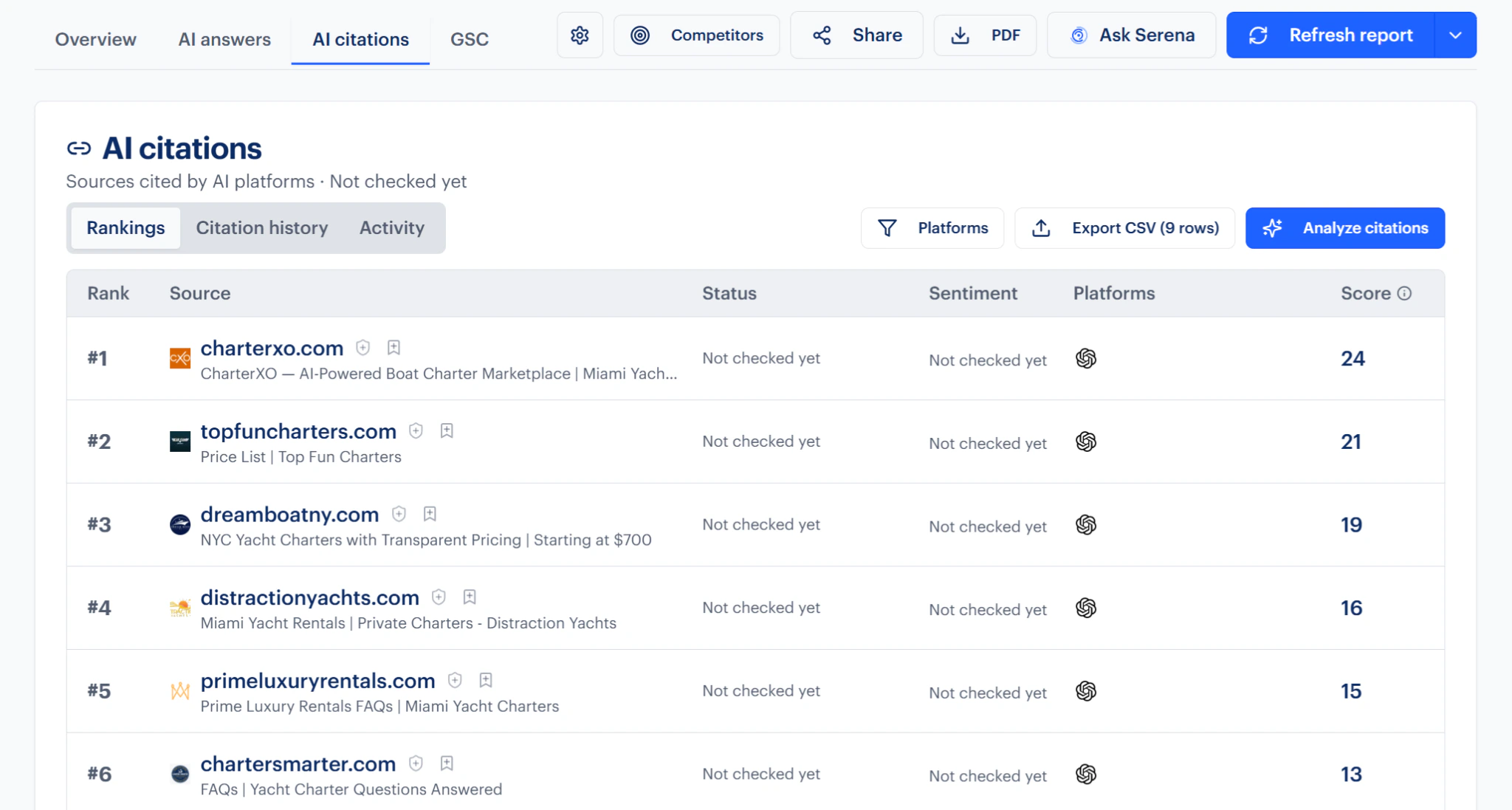
Surface coverage. Based on my tests, Rankability samples from three ChatGPT surfaces: model-only answers, ChatGPT Search, and fan-out queries.
Each tracked prompt gets its own visibility report with data on your brand’s AI Search Performance Score, which brands have the highest visibility for that prompt, and the websites ChatGPT cites for it.
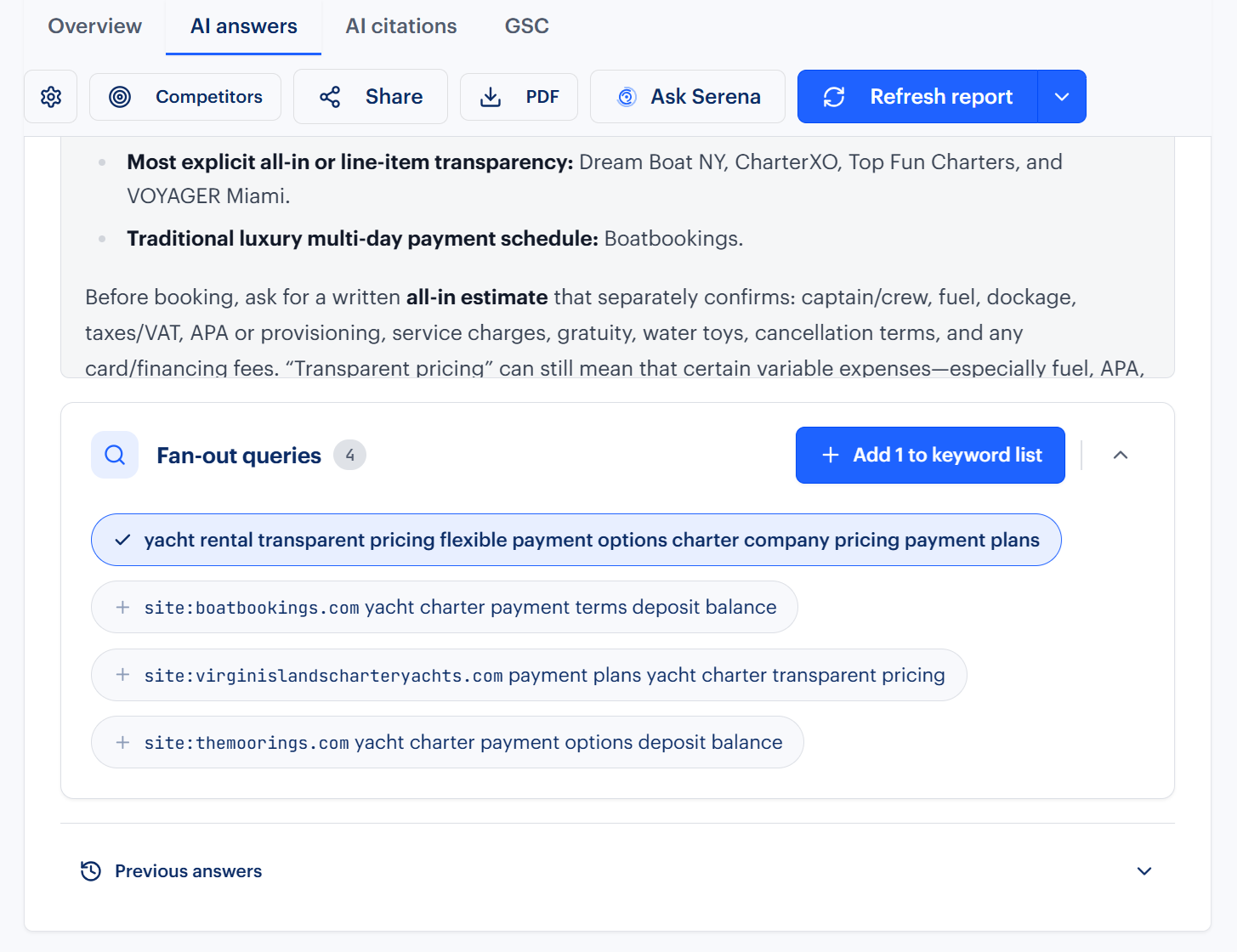
Sub-query visibility. A** “Fan-out queries”** drop-down menu shows the fan-out queries that ChatGPT ran for a target prompt. You can select any of these sub-queries for dedicated tracking.
Samples per prompt. Rankability lets you choose from one-off, daily, weekly, and monthly prompt sampling.
What Rankability is good at
Rankability’s built-in AI assistant, Serena, lets you dig deeper into your ChatGPT visibility data by asking questions about it. When I tried this on one of my prompts’ reports, Serena immediately ran a sample prompt to start the analysis.
Where Rankability falls short
Rankability’s visibility report covers three fixed timeframes: the last seven, 30, and 90 days. These options may be too rigid if you want to isolate a custom period, like when a specific event affected your visibility.
Rankability pricing
As of October 2026, Rankability’s pricing page lists its prices as:
- Starter: $97 per month (or $970 per year billed annually) for 100 AI queries.
- Agency: $297 per month (or $2,970 per year billed annually) for 300 AI queries.
- Agency Pro: $497 per month (or $4,970 per year billed annually) for 500 AI queries.
Seven-day free trials of all plans are available and require a credit card.
Who should pick Rankability
Since Rankability also includes keyword research and traditional Google rank tracking, it’s best for agencies that need to track their clients’ ChatGPT visibility alongside conventional SEO work.
3. Morningscore
Morningscore describes itself as a gamified SEO and AI search tool that helps small companies improve Google and AI search visibility by undertaking “missions” corresponding to their visibility goals.
Surface coverage. As of my tests in September 2026, Morningscore offers ChatGPT model-only answer and ChatGPT Search coverage.
Morningscore shows you whether ChatGPT mentioned your brand, which websites it cited, and whether competitors appeared in the same answers.
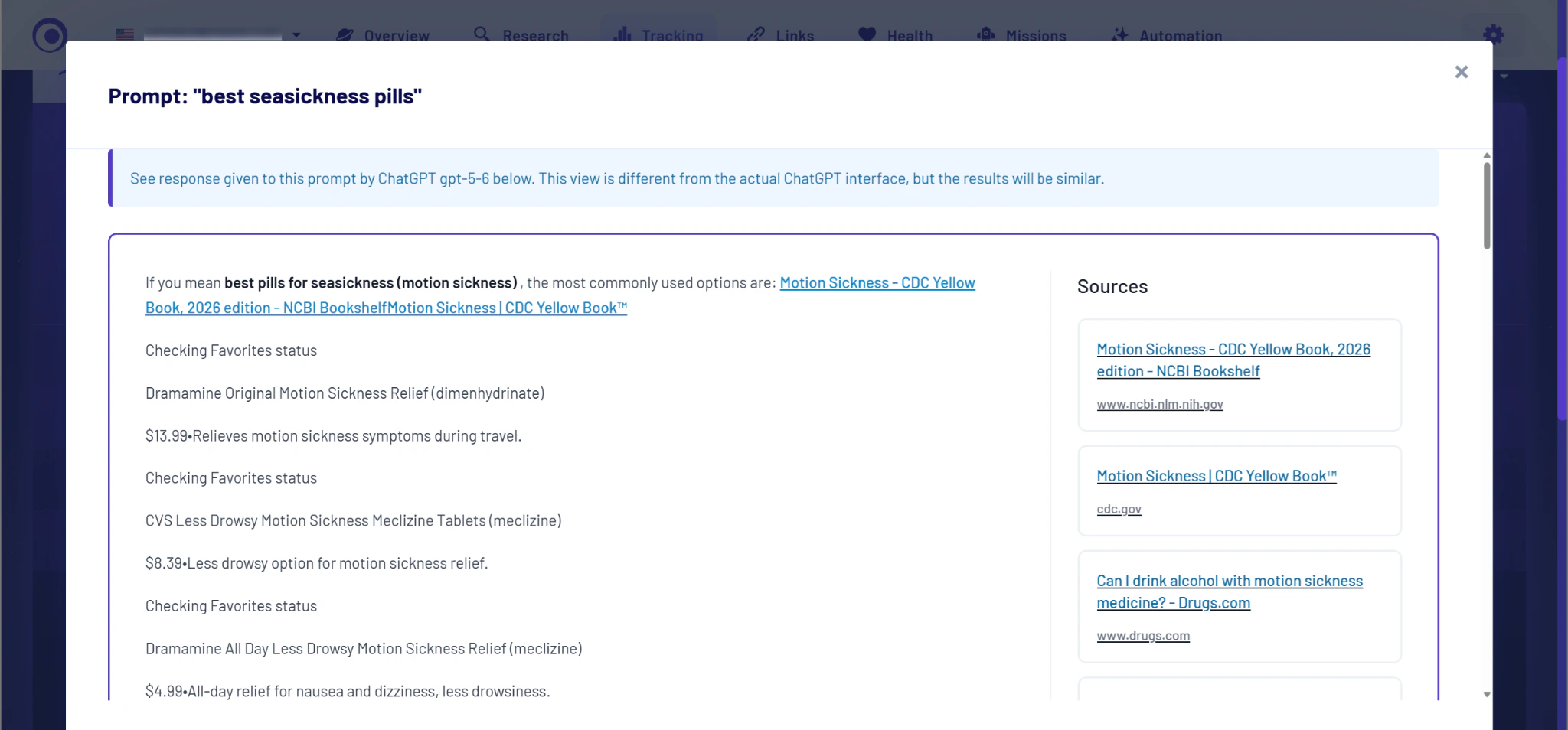
Morningscore’s ChatGPT rank tracker page says the tool uses ChatGPT data scraped by a third party, Cloros, instead of sampling data itself. This means Morningscore may have limited control over that data’s quality.
Sub-query visibility. Morningscore doesn’t appear to show ChatGPT’s fan-out queries for tracked prompts.
Samples per prompt. As of October 2026, Morningscore’s pricing page lists weekly prompt checks.
What Morningscore is good at
Morningscore lets you track multiple brand names, which helps you compare ChatGPT visibility across related brands or combine data for common spelling variations of one brand.
Where Morningscore falls short
Morningscore doesn’t seem to provide ready-to-share reports. You’ll need to export its visibility data as a CSV and build the reports yourself.
Morningscore pricing
As of October 2026, Morningscore’s pricing page lists its prices as:
- Lite: $69 per month (or $690 per year billed annually) for 10 prompts.
- Business: $99 per month (or $990 per year billed annually) for 100 prompts.
- Pro: $159 per month (or $1,590 per year billed annually) for 500 prompts.
- Premium: $299 per month (or $2,990 per year billed annually) for 2,000 prompts.
A 14-day free trial with limited usage is available and doesn’t require a credit card.
Who should pick Morningscore
Morningscore is best for in-house teams that want simple ChatGPT tracking inside their SEO tool and don’t need to produce reports for other stakeholders.
4. Rankscale
Rankscale is an AI visibility platform that provides in-depth brand visibility tracking, including citation, sentiment, and competitor analysis, across more than 17 AI engines.
Surface coverage. Rankscale covers all four ChatGPT surfaces of model-only answers, ChatGPT Search, ChatGPT Shopping, and fan-out queries.
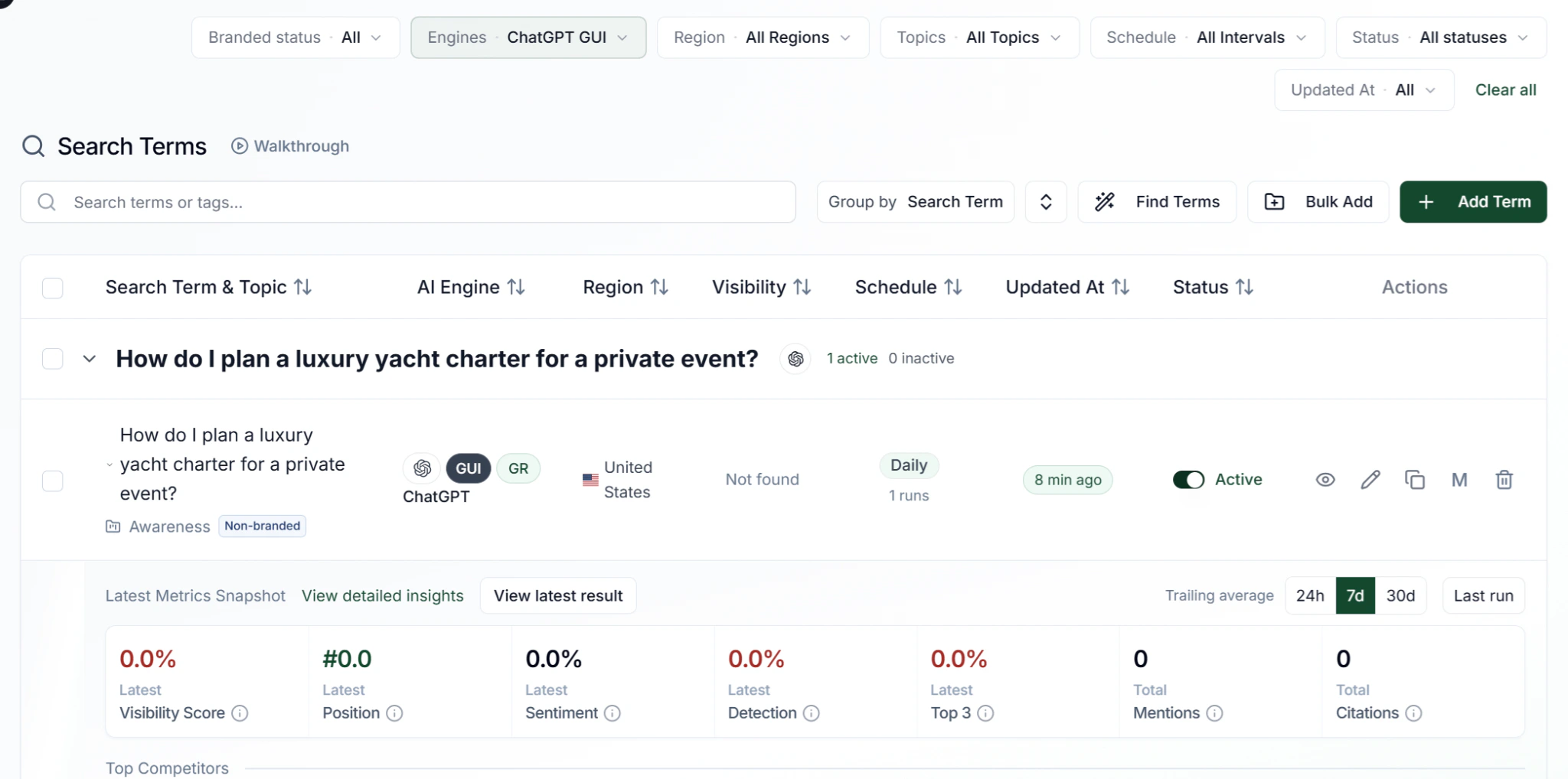
From my tests, Rankscale’s “Search terms” report shows metrics like visibility score, latest position, latest sentiment, mentions, and citations for your brand and competitors. The report also lets you apply filters like branded status, region, and topics.
Separately, Rankscale’s “Shopping & Ads” report tracks your products’ visibility for shopping-related ChatGPT queries.
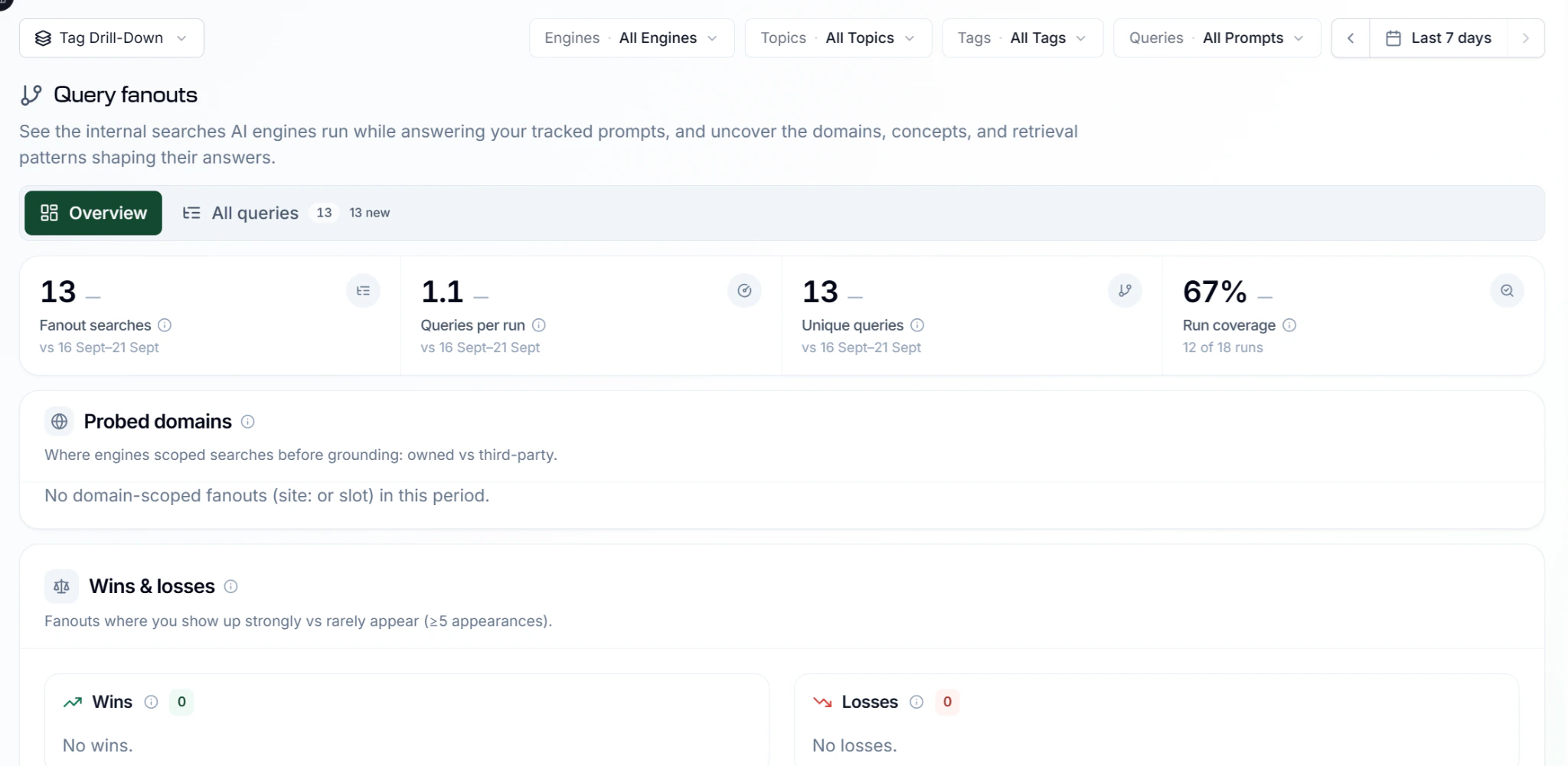
Sub-query visibility. The “Search terms” report shows ChatGPT’s fan-out queries for your target prompts. There’s also a dedicated “Query fanouts” report that tracks these queries in more detail, including whether you’ve won or lost them, and newly seen or shifting queries.
Samples per prompt. Rankscale can sample prompts as frequently as once per hour, which is notable for tools in this category. Daily, weekly, and monthly (with optional bi-cadence) sampling is also available.
What Rankscale is good at
Rankscale categorizes prompts into three stages: “Awareness,” “Consideration,” and “Purchase,” helping you measure your brand’s visibility across each step of the customer journey.
Where Rankscale falls short
Rankscale suggests content improvements, but it can’t create content. So, you’ll need to do this using a separate tool.
Rankscale pricing
As of October 2026, Rankscale’s pricing page lists its prices as:
- Essentials: $17 per month for up to 480 AI answers. This plan is available only on annual billing.
- Pro: $99 per month (or $84 per month billed annually) for up to 4,800 AI answers.
- Pro+: $229 per month (or $195 per month billed annually) for up to 12,000 AI answers.
- Growth: $385 per month (or $327 per month billed annually) for up to 22,000 AI answers.
- Enterprise: $780 per month (or $663 per month billed annually) for up to 48,000 AI answers.
A seven-day free trial of the Pro plan is available and requires a credit card.
Who should pick Rankscale
Rankscale is best for ecommerce businesses that want to track how their products appear in ChatGPT Shopping and measure visibility across the customer journey, from awareness to purchase.
5. ProRankTracker
ProRankTracker is a rank tracking and reporting platform that monitors localized keyword positions across Google and YouTube, with ChatGPT and other AI engines supported as extra tracked surfaces.
Surface coverage. From my tests, ProRankTracker’s ChatGPT surface coverage includes model-only answers and ChatGPT Search.
The tool’s “AI Platforms” report tells you whether ChatGPT has mentioned you or linked to your website, which pages it linked to (including competitors’), and your page’s ranking among ChatGPT’s citation sources.
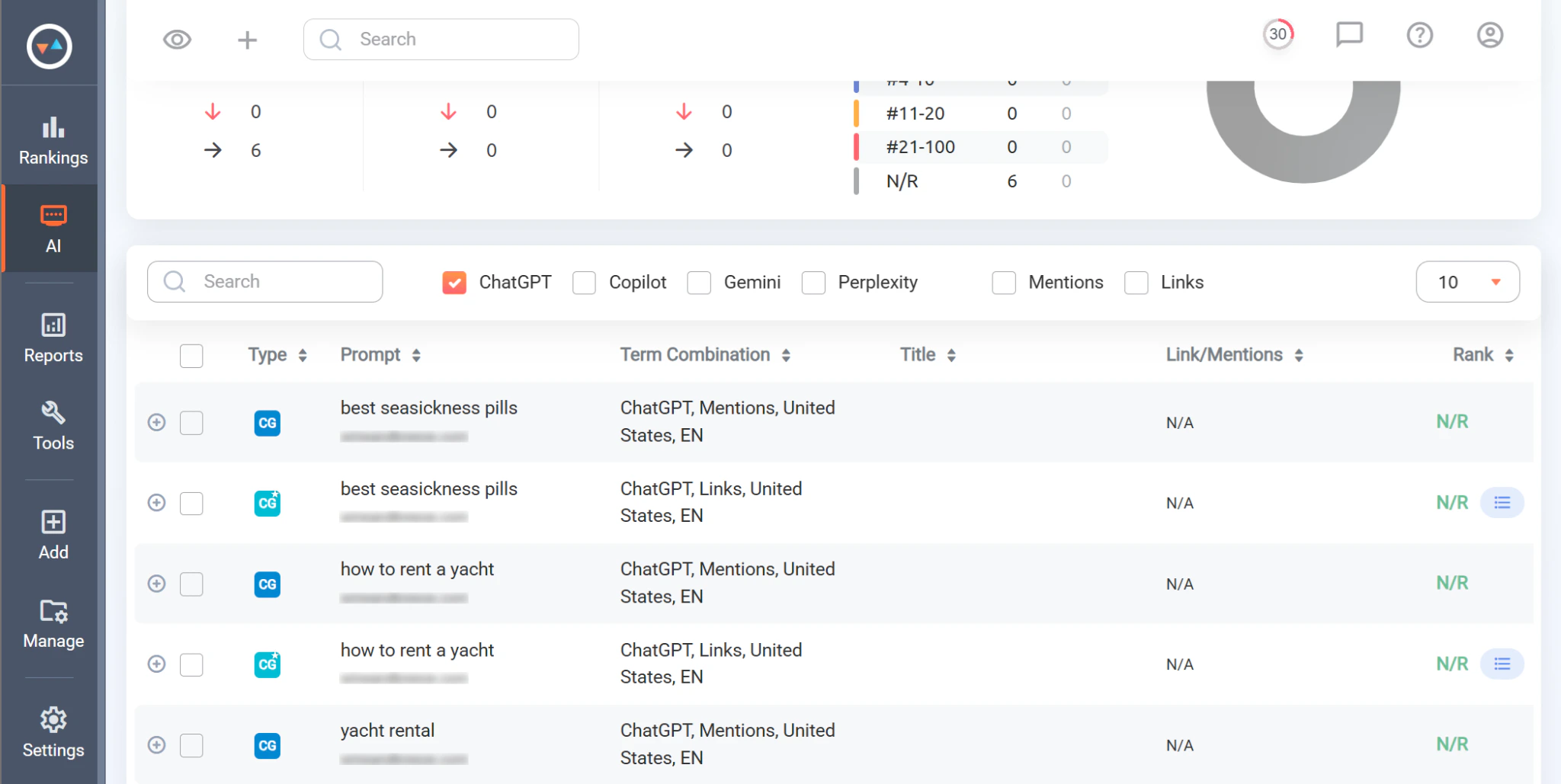
ProRankTracker also tracks daily, weekly, and monthly ChatGPT visibility trends.
Sub-query visibility. ProRankTracker doesn’t show ChatGPT’s fan-out queries, based on its public documentation and my own testing.
Samples per prompt. ProRankTracker samples prompts daily, according to its pricing page.
What ProRankTracker is good at
ProRankTracker’s ChatGPT tracker page lists white-labeled reports as a built-in feature, which is helpful for presenting visibility data with your branding instead of the tool’s.
Where ProRankTracker falls short
ProRankTracker doesn’t seem able to differentiate between branded and non-branded prompts. Isolating prompts to measure brand awareness may be more challenging as a result.
ProRankTracker pricing
As of October 2026, ProRankTracker’s pricing page lists its prices as:
- Starter: $99 per month (or $89 per month billed annually) for 1,000 terms.
- Pro: $149 per month (or $134 per month billed annually) for 2,000 terms.
- Agency: Starts at $199 per month (or $179 per month billed annually) for 3,000 terms.
“Terms” are ProRankTracker’s billing units. Tracking one prompt on one AI engine uses two terms.
A seven-day free trial for tracking 100 terms is available and doesn’t require a credit card.
Who should pick ProRankTracker
ProRankTracker is best for in-house teams that already rely on it for tracking Google and YouTube rankings and want to report on basic ChatGPT visibility without using a separate tool.
6. Cairrot
Cairrot is an AI visibility platform that reports on mentions and citations across ChatGPT and other AI engines. It also has a free Chrome extension for checking ChatGPT fan-out queries in real time.
Surface coverage. Cairrot’s surface coverage includes ChatGPT’s model-only answers and ChatGPT Search. Its public pages don’t say whether it tracks fan-out queries, but my tests showed that it does.
The “Prompts” report lists your average visibility for prompts across all supported AI engines and the competitors, if any, that ChatGPT mentions in answers.
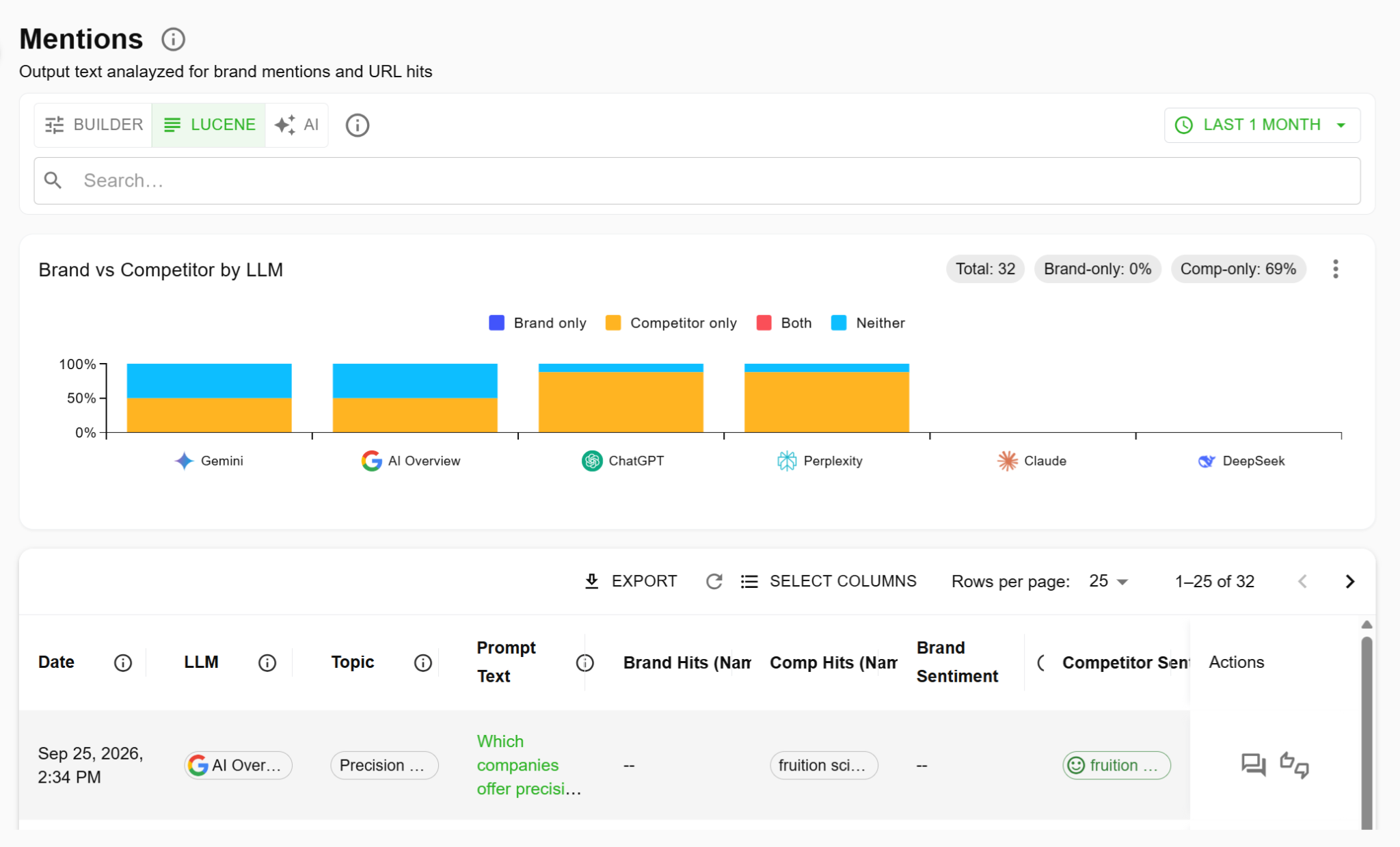
A separate “Mentions” report tracks the number of times ChatGPT mentions your brand and competitors, plus the associated sentiment.
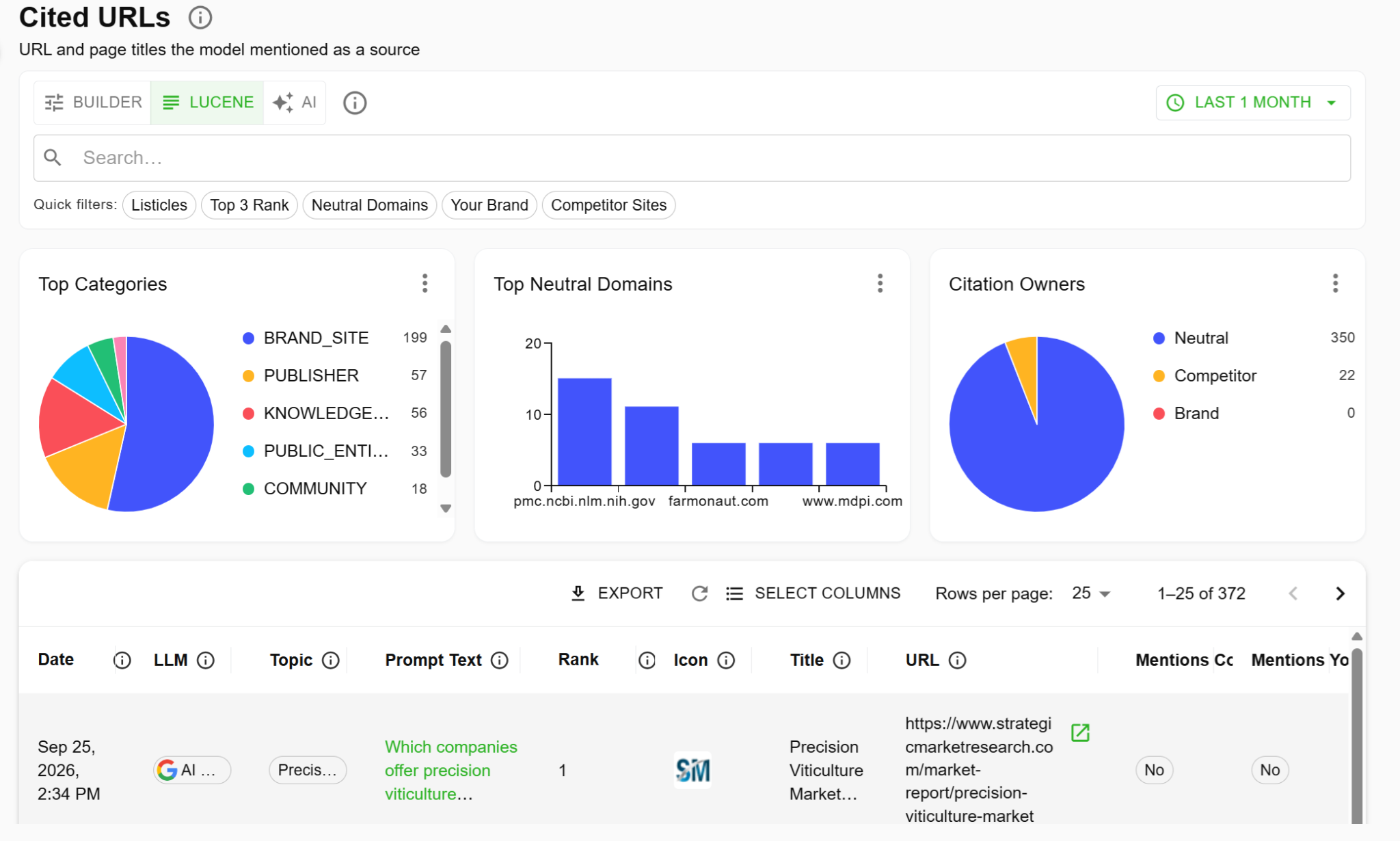
For ChatGPT citation tracking, go to Cairrot’s “Cited URLs” report. It lists whether ChatGPT cited your brand, competitors, or third-party sources, and categorizes citations by website type, like brand site, publisher, and knowledge base. The report also provides each citation’s URL.
Sub-query visibility. When you expand any tracked prompt, you’ll see the fan-out queries ChatGPT ran to gather information for its answer.
Cairrot also has a free Chrome extension that shows ChatGPT’s fan-out queries in real time as you prompt the AI engine.
Samples per prompt. After reviewing Cairrot’s public pages and testing the tool, I wasn’t able to find out how often Cairrot samples prompts. I wrote to Cairrot’s support team to ask but haven’t heard back.
What Cairrot is good at
Cairrot provides AI-generated buyer personas as part of the onboarding process. You can also create your own personas in the tool. You can then break down your visibility data by persona to study how each kind of buyer might discover your brand in ChatGPT.
Where Cairrot falls short
Cairrot’s filters are rule- and syntax-based, so they took some getting used to during my tests. The tool’s AI-powered search may be an easier way of applying filters.
Cairrot pricing
As of October 2026, Cairrot’s pricing page lists its prices as:
- Starter: $39 per month for 15 prompts.
- Pro: $99 per month for 40 prompts.
- Enterprise: $299 per month for 100 prompts.
But my Cairrot account’s billing page lists these plans’ prices as $39.99, $99.99, and $299.99 per month, or $35.99, $89.99, and $225 per month when billed annually, respectively.
A free trial for running one AI visibility report for up to eight prompts is available and doesn’t require a credit card.
Who should pick Cairrot
Cairrot is best for marketers who want to tailor their ChatGPT visibility tracking to specific buyer personas and are comfortable with using rules- and syntax-based filters.
7. Geoptie
Geoptie is an AI visibility platform that tracks mentions and citations across up to seven AI engines, while offering GEO audits and content optimization.
I wasn’t able to test Geoptie, so I reviewed its public pages to learn about it.
Surface coverage. As of September 2026, Geoptie’s ChatGPT surface coverage includes ChatGPT model-only answers and ChatGPT Search.
Sub-query visibility. Geoptie’s public pages don’t seem to say that it shows ChatGPT’s fan-out queries.
Samples per prompt. Geoptie’s pricing page says the tool samples prompts daily.
What Geoptie is good at
All Geoptie plans come with unlimited content optimization and generation, according to the tool’s pricing page. You don’t need a separate tool for improving your content once you’ve checked your visibility.
Where Geoptie falls short
Geoptie’s ChatGPT rank tracker page says the tool tracks answers from GPT-4o and GPT-5. Although both models are still available via API, OpenAI has retired them from its web and desktop apps. So, Geoptie’s visibility data may not match what users currently see.
Geoptie pricing
As of October 2026, Geoptie’s pricing page lists its prices as:
- Starter: $49 per month (or $41 per month billed annually) for 15 prompts.
- Professional: $99 per month (or $83 per month billed annually) for 100 prompts.
- Enterprise: $399 per month (or $333 per month billed annually) for 400 prompts.
The Enterprise plan lets you track additional prompts for $99 per month per extra block of 100.
Geoptie doesn’t have a free plan or trial. But when you sign up, the tool gives a complimentary real-time snapshot of your (and your competitors’) ChatGPT visibility for up to 10 target prompts before you’re asked to pick a plan.
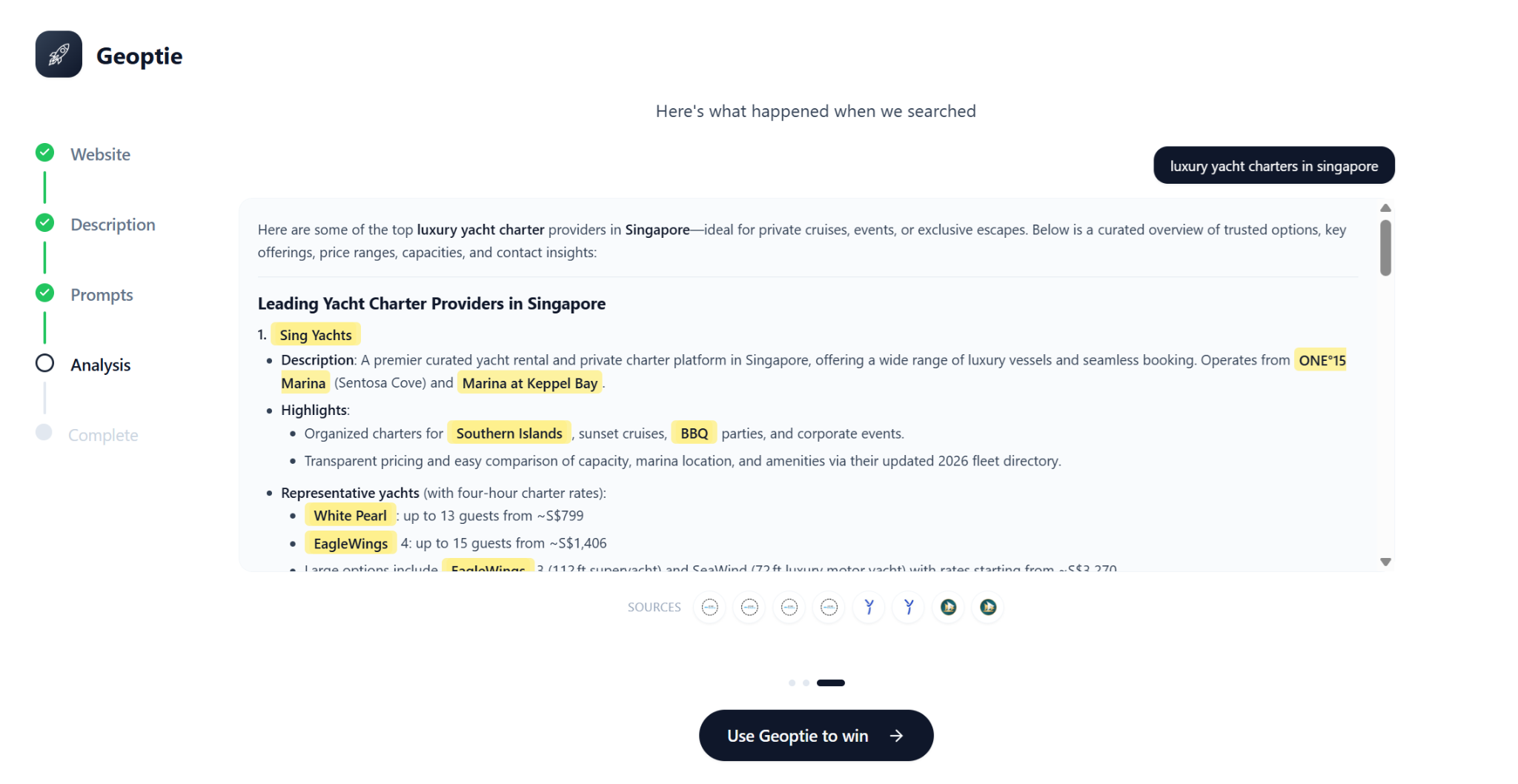
Geoptie’s website also provides a free, less detailed visibility snapshot on its ChatGPT rank tracker page, with no signup needed.
Who should pick Geoptie
Geoptie is best for content teams that want to find and fix ChatGPT visibility gaps with no limit on the amount of content they optimize or generate.
8. LPagery
LPagery is primarily a WordPress plugin for bulk-generating localized service pages, but it also has a separate AI rank tracker tool for monitoring AI visibility.
Surface coverage. Based on my tests, LPagery covers ChatGPT model-only answers and ChatGPT Search.
LPagery primarily tracks keywords, not prompts. Its “Keywords” report shows an AI visibility score, whether you’re mentioned, the brands that compete with you for that keyword, AI prompts that include the tracked keyword, and the websites ChatGPT cites in its answers.
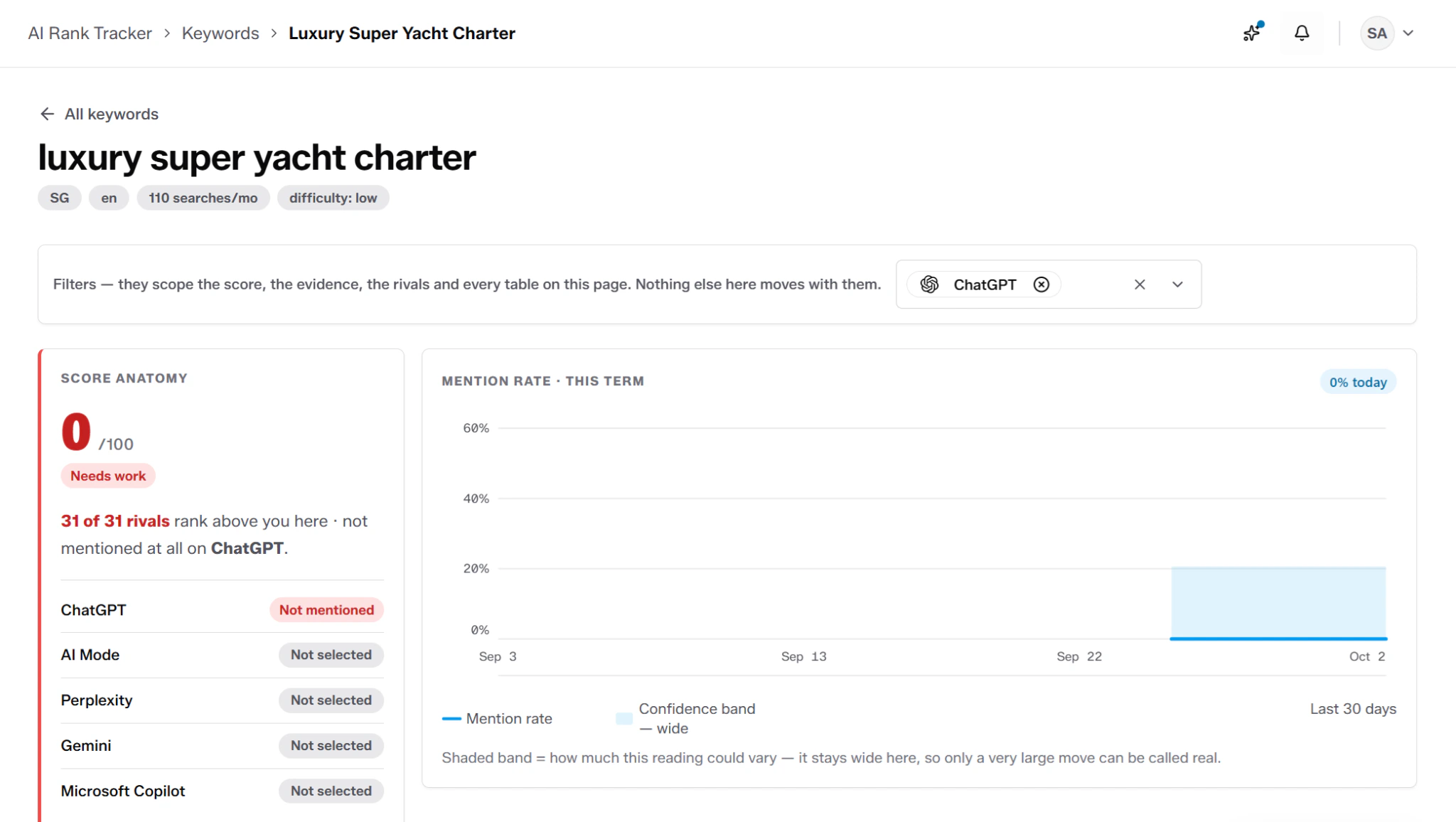
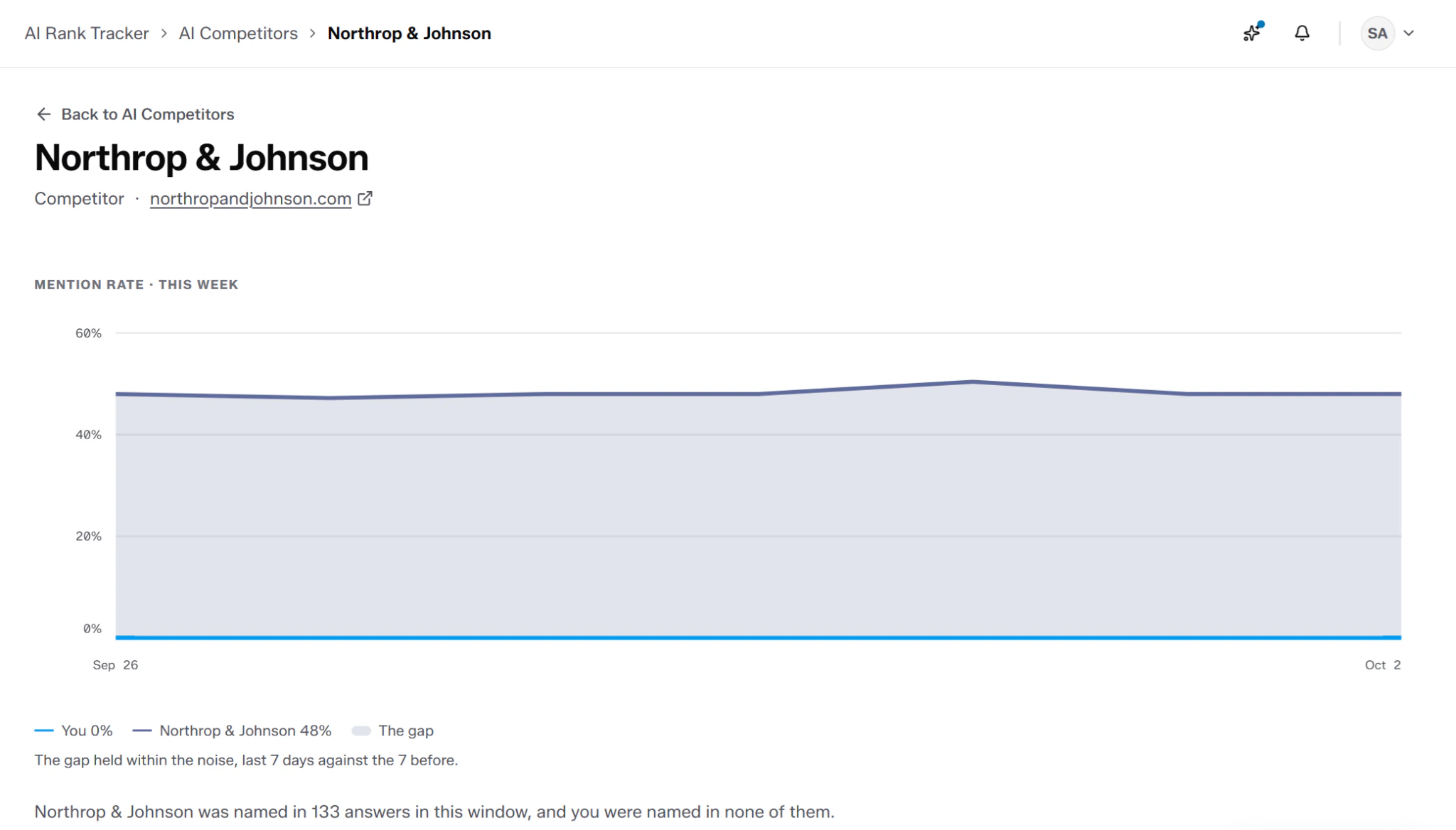
The “AI Competitors” report ranks how visible your competitors are in answers across AI engines, benchmarked against your own. Click any competitor to see a detailed comparison of their mention rate with yours. You’ll also see the specific answers that mentioned them and whether you were named alongside them.
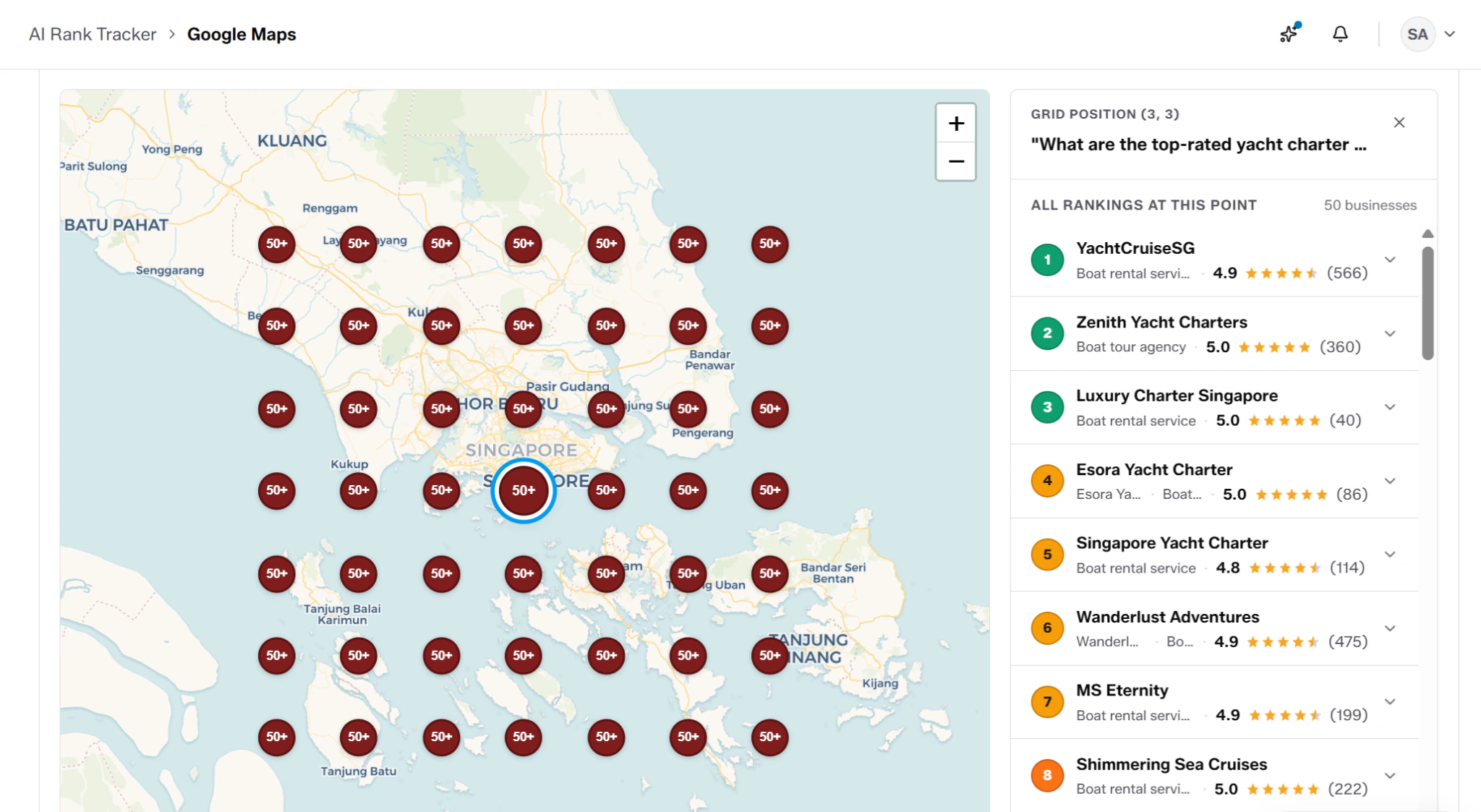
LPagery’s “Google Maps” report shows your Google Maps rankings for your tracked keywords on a map grid.
Sub-query visibility. LPagery doesn’t seem to show ChatGPT’s fan-out queries, based on my tests.
Samples per prompt. LPagery samples prompts daily, according to its pricing page.
What LPagery is good at
LPagery recommends fixes for improving visibility. It explains what each fix helps with and how to do it. For example, a recommendation to create a new page might include suggested H2 headings and content sections.
Where LPagery falls short
LPagery is more of a tool for tracking keywords than prompts. While you could enter each prompt as a keyword to track, the tool’s keyword report will also show visibility data for differently worded prompts. As a result, it’s harder to get clean visibility data for the exact prompt you want to track.
LPagery pricing
As of October 2026, the pricing page for LPagery’s AI rank tracker lists its prices as:
- Starter: $49 per month (or $490 per year billed annually) for 10 prompts.
- Pro: $129 per month (or $1,290 per year billed annually) for 25 prompts.
- Agency: $249 per month (or $2,490 per year billed annually) for 50 prompts.
Seven-day free trials of all plans are available and require a credit card.
Who should pick LPagery
LPagery is best for location-based businesses that want to track AI visibility in specific geographical markets and bulk-generate localized service pages for each one.
What can free ChatGPT rank tracking tools tell you?
Free ChatGPT rank tracking tools can tell you whether your brand appears for various prompts over a short period, often seven or 14 days. They can’t give any visibility history beyond that, which limits their long-term usefulness.
Most ChatGPT rank trackers don’t have forever-free plans. Rather, they have seven- or 14-day trials for tracking a fixed number of prompts. For example, Searchable’s 14-day free trial gives you full access to the platform, including tracking up to 500 prompts per AI engine. Cairrot’s trial works differently from most: the tool lets you run a one-off AI visibility report instead of capping tool usage to a number of days.
ChatGPT rank trackers provide these trials mainly to help prospects test whether the tool is right for them before paying for it. You could use these trials to answer the question of “What’s my visibility for these prompts right now?” But this information has limited value when ChatGPT could omit mentioning your brand the next day.
What matters more is tracking how your ChatGPT visibility changes over time. This way, you can take steps to increase AI citations and mentions.
How to choose a ChatGPT rank tracker for your situation
Choose a ChatGPT rank tracker by matching the tool’s prompt sampling frequency to the decision you need to make.
A founder checking whether they appear at all could use a tool’s free trial. A team reporting monthly, on the other hand, needs frequent sampling and historical visibility data. And, an agency monitoring across multiple clients needs per-client workspaces and white-label reporting more than it needs extra AI engines, especially if clients want only ChatGPT tracking.
Here’s our recommended tool for each scenario:
-** Solo founders checking whether they appear at all:** Use Cairrot. Its one free AI visibility report is enough to get a quick understanding of your visibility across three ChatGPT surfaces (though not ChatGPT Shopping). Cairrot is also one of the most budget-friendly tools if you decide to upgrade after that. -** In-house teams reporting monthly:** Use ProRankTracker. It reports on your mentions, citations, and visibility trends, sampling prompts daily for higher accuracy. It can also white-label reports, so that those you send to stakeholders reflect the organization’s branding. -** Agency running reporting for multiple clients:** Use Searchable. It tracks visibility across four ChatGPT surfaces for the most comprehensive coverage. Its filtering and reporting are flexible enough for reporting on almost any dimension clients might want to see. You can also create white-labeled reports and set up separate projects for monitoring each client’s visibility. Preview what Searchable can reveal about any brand’s ChatGPT presence (yours, your client’s, or their competitors’) with a free visibility report.
For more AI visibility tool options, including those that track other AI engines like Perplexity and Gemini, check out our guide to the best AEO tools.
Frequently asked questions
ChatGPT tracking tools measure your mentions and citations, and those of competitors, across ChatGPT surfaces like model-only answers, ChatGPT Search, ChatGPT Shopping, and fan-out queries. In contrast, ChatGPT rank trackers usually report on a brand’s position in ChatGPT’s citation list. Some ChatGPT tracking tools include rank tracking capabilities, so you don’t need separate tools for a fuller view of your ChatGPT visibility.

