
Query fan-out is the process an AI engine uses to turn a prompt into multiple sub-queries, run the searches in parallel, and build a single answer from the results. Sub-queries rarely match the prompt a user typed, so teams should plan content around question clusters rather than individual prompts. Sub-queries commonly add a year, a price angle, the words best or top, or a site: operator pointing at a specific domain such as G2 or Reddit. In August 2026, ChatGPT roughly doubled its research depth, and answers running multi-query research rose from 2% to 57%. Measure fan-out coverage by the sub-queries your brand appears for, your share of voice against competitors, and the sources engines cite when you are absent.
Ask ChatGPT a question and it will run its own research before responding. During this step, it performs several searches in the background, each one phrased differently from your question. This process is called query fan-out.
Overlooking this process can lead content teams to waste time. They’ll pick a prompt, track it, and build a page to answer it, but the AI engine never actually searches for the question they tried to answer: it searches for multiple different sub-queries instead.
In this guide, we cover how query fan-out works and how to plan your content around it.
Key Takeaways
- Query fan-out is the process AI engines use to perform research when answering prompts.
- It consists of splitting a prompt into multiple background searches (i.e., sub-queries) and then building an answer from the combined results.
- Sub-queries usually don’t match the original prompt, which means teams need to optimize for question clusters rather than individual prompts.
- Measure coverage on the sub-query level: which sub-queries you appear for, your share of voice compared to competitors, and which sources get cited instead of your website.
- ChatGPT doubled its research depth in August 2026, making query fan-out a standard process for answering prompts.
- Answer engines research information from specific domains directly, so a positive reputation on review platforms and business directories is key.
What is query fan-out?
Query fan-out (sometimes spelled as “query fanout”) is the process an AI engine uses to turn a prompt into multiple sub-queries, run the searches in parallel, and build a single answer from the results. Instead of searching for your exact prompt, the engine performs research from multiple angles at once.
This means that your pages are scored against sub-queries users didn’t actually type. Your website may get cited for a prompt without ranking for a matching search query, or be absent from a prompt whose search query it ranks number one for in traditional search engines.
Google first introduced the term at I/O 2025, explaining that AI Mode breaks down a question into subtopics and performs multiple searches simultaneously to build an answer. Other AI engines, including ChatGPT and Perplexity, also use this technique.
The sub-queries used in the process are generated fresh on every run, and running the same prompt multiple times might result in different sub-queries.
How query fan-out works
Query fan-out occurs in four stages: the answer engine analyzes the prompt and the intent behind it, generates sub-queries that cover the assumed intent, retrieves and scores results for the sub-queries, and then synthesizes a single response.
- Intent analysis: First, the engine identifies what a user is actually asking, including needs and context that may not have been explicit in the original prompt.
- Sub-query generation: It generates multiple sub-queries, each targeting intent from a different angle.
- Retrieval and scoring: Each sub-query runs as a separate search, with the results scored for relevance at the passage level.
- Synthesis: The engine generates an answer by combining information from the highest-scoring passages and citing the sources it used the most.
The point of performing the extra searches is to provide a more complete answer. By performing multiple sub-queries, an engine can compare sources and address parts of the question the user never explicitly asked about.
Intent analysis
“help desk software”
Assumed intent: a buyer comparing tools, prices, and reviews
Sub-query generation
- best help desk software 2026
- help desk software pricing
- Zendesk alternatives
- site:g2.com help desk software
Retrieval and scoring
Each sub-query runs as its own search, and the engine scores the passages it finds for relevance.
Synthesis
AI engines are leaning harder on query fan-out over time. ChatGPT roughly doubled its research depth in August 2026, and multi-query research jumped from 2% of answers to 57%.
Query fan-out only covers the retrieval side of an answer. The rest comes from the engine’s built-in knowledge and training data. You can learn more about this in our guide on where ChatGPT gets its data.
Note: Our data covers ChatGPT and Perplexity, the two engines in which we can observe sub-queries directly. Google does not expose them, so nothing here should be understood as a claim about AI Overviews or AI Mode.
Why you should strategize for fan-out, not just for prompts
You should strategize for query fan-out because appearing in results for sub-queries heavily influences whether your brand appears in an answer to an actual user prompt.
Our own research confirms this. Out of 1,154,930 recorded sub-queries across ChatGPT and Perplexity, only five matched their respective prompts. The rest were rewritten, reworded, expanded, or narrowed down versions of prompts.
So if you’re currently approaching this through a traditional SEO lens and optimizing for a specific keyword or prompt, you’re focusing on the wrong thing.
Beyond query fan-out, prompt tracking is still useful for search marketers because it helps you sample real customer questions and measure outcomes. But a prompt is only a doorway to a cluster of related sub-queries, and your content plan needs to cover the entire cluster.
Note: Search rankings still matter too, since retrieval tends to run through a search index. Query fan-out just adds another dimension on top of your SEO work.
The sub-questions AI actually asks
We’ve noticed a few patterns in the sub-queries we’ve captured. They commonly include:
- A year
- A price or cost angle
- The words “best” or “top”
- A “site:” search operator that points to a specific domain
You can think of each of these as angles for your content. For example, if you see answer engines frequently adding a cost question to prompts in your category, then you should prioritize including pricing in your content as well as on its own dedicated pricing page.
Here’s how query fan-out tends to play out across queries related to ecommerce, B2B software, and local businesses.
Ecommerce
A prompt such as “best trail running shoes for beginners” usually leads to sub-queries like “best trail running shoes 2026,” “trail vs road running shoes,” and review searches for specific models.
With ecommerce prompts, buying modifiers tend to dominate, so your product pages should include visible pricing, current specifications, and comparison content.
B2B software
A prompt like “help desk software” typically results in sub-queries like “best help desk software 2026,” “help desk software pricing,” “Zendesk alternatives,” and “site:g2.com help desk software.”
With review sites like G2 appearing as their own sub-queries in B2B software-related prompts, it’s important for software companies to optimize their profiles on these third-party platforms.
Local business
Prompts for local businesses tend to fan out to sub-queries related to cost, trust, and business directories. For example, a prompt such as “emergency plumber in Denver” leads to sub-queries like “emergency plumber Denver cost,” “24 hour plumber Denver reviews,” and “site:yelp.com plumber Denver.”
This makes it important for local businesses to publish pricing pages and keep their directory profiles up to date.
How to find fan-out queries for your topics
You can find fan-out queries for your topics in three ways:
- Watch an engine run the sub-queries manually
- Use a free tool to model sub-queries
- Track sub-queries at scale using a tool like Searchable
Watch the engine run sub-queries manually
Some answer engines (such as Perplexity) show you exactly what they search for when researching for your prompt. Run your prompt and then examine the queries an engine displays while researching the answer.
In Perplexity, you can do this by clicking on Research > Searching the web at the top of an answer.
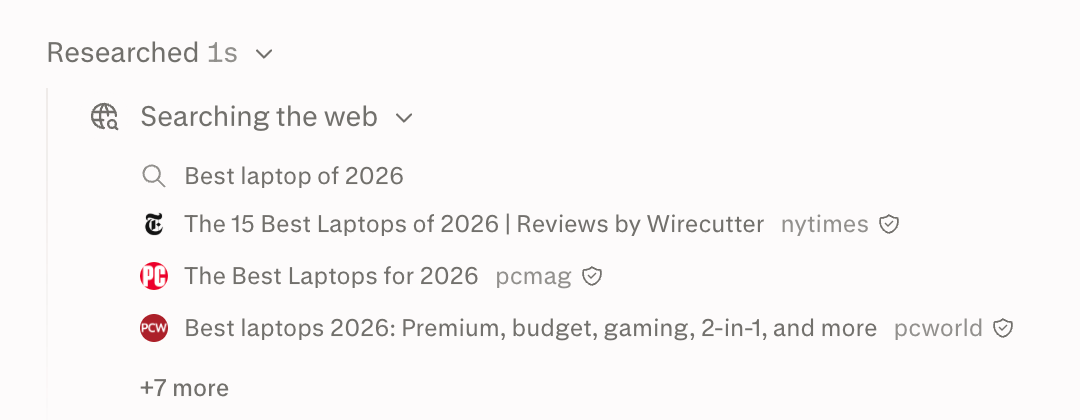
Note down the exact queries but focus on the intent because the wording is likely to change on every run. After doing this a few times, you should get a feel for recurring query angles in your category.
This method is completely free and focused on an engine’s actual behavior, so it’s a good starting point. But it’s also slow, very manual, and doesn’t tell you anything about your competitors’ share of voice in the sub-query results.
Tip: Run each prompt at least three times before making any conclusions. Engines generate fresh sub-queries on every run, so running a prompt once will only give you one sample.
Use a free tool to model sub-queries
You can use the free Query Fan-Out Tool to replicate the way LLMs perform query fan-out for a specific prompt.
Google doesn’t actually provide access to its sub-queries, so anything you get from the Query Fan-Out Tool is an approximation at best. Nonetheless, it’s a useful complement to your manual observations.
Track sub-queries at scale using a tool
Searchable’s Query Fanout dashboard lets you track and analyze sub-queries. It shows you the actual sub-queries engines run for your tracked prompts and how often they occur.
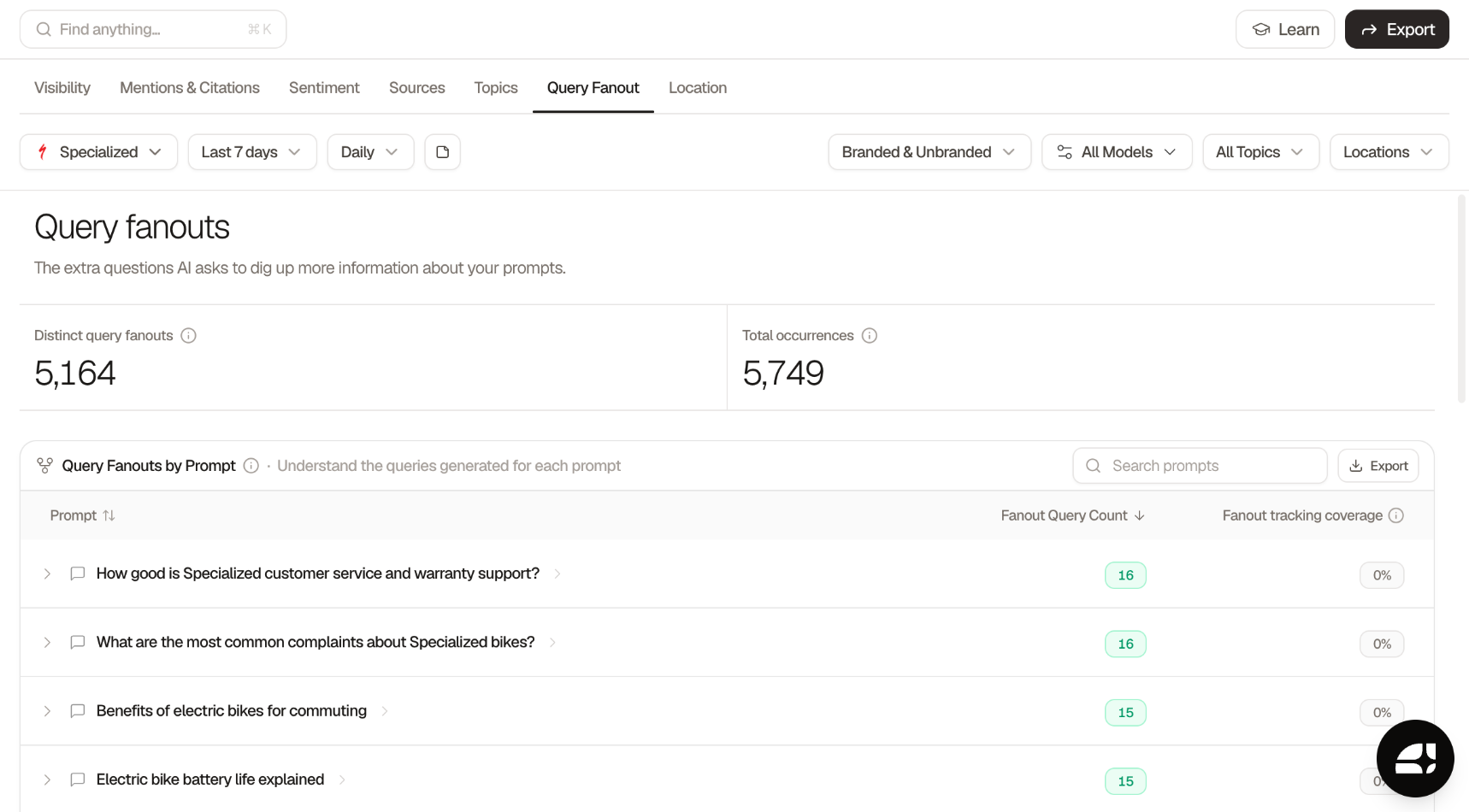
You can also see a list of brands and phrases mentioned across prompt sub-queries, along with how frequently they’re mentioned.
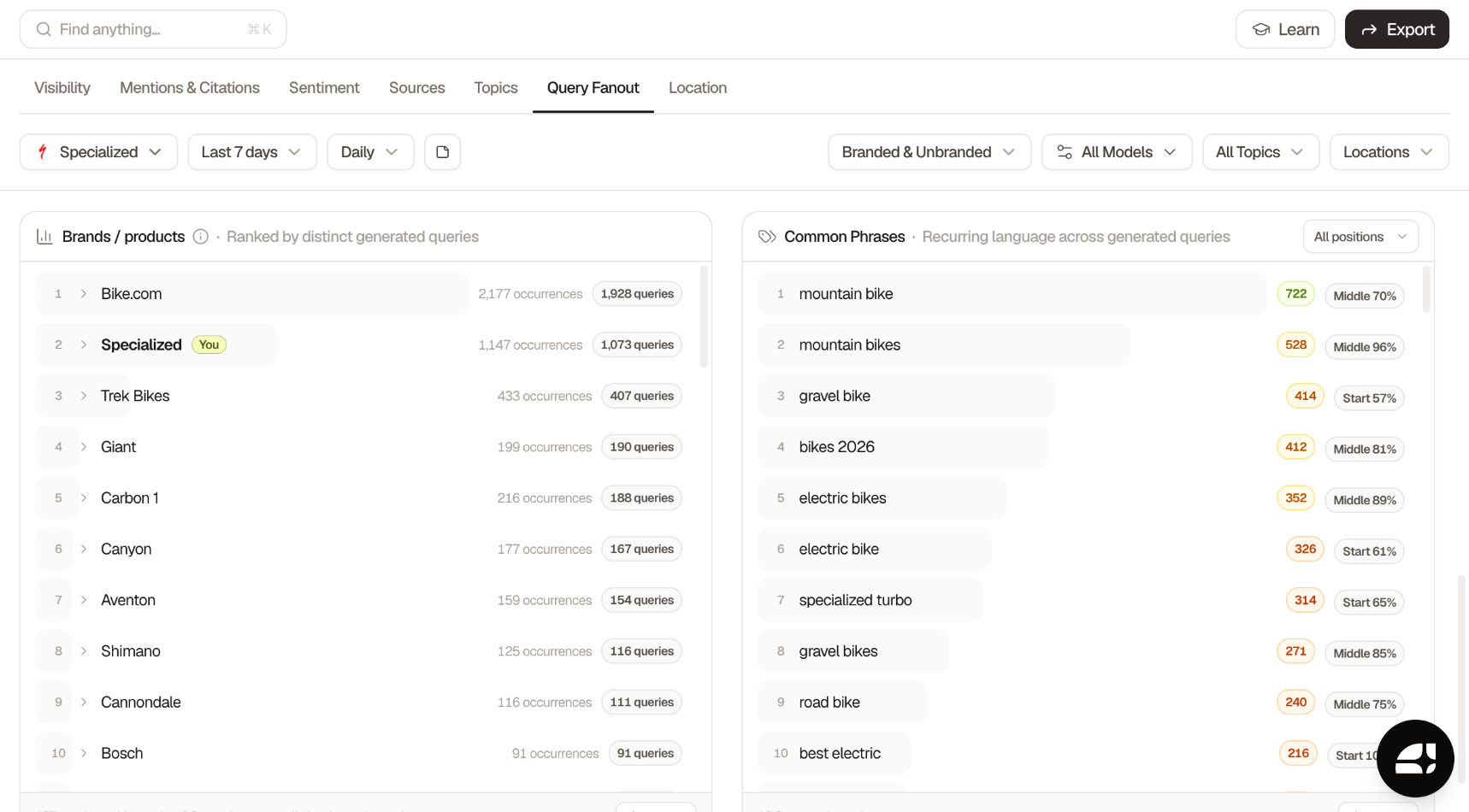
If you’re only tracking a handful of prompts, the manual method we outlined above is likely enough. But for brands tracking tens or hundreds of prompts across multiple engines, a dedicated fan-out dashboard lets you surface patterns with ease and allows you to build out a content plan based on real data.
How to optimize your content for query fan-out
You can optimize your content for query fan-out by:
- Covering the full question cluster around each topic
- Addressing the modifier angles directly
- Building your presence on the domains answer engines check
- Prioritizing commercial topics
Cover the question cluster, not the keyword
Structure each core topic using the hub and spoke model: one pillar page answering the central question, linked to spoke pages that each address a subtopic. This way, your pillar page has the broad answer, while spoke pages contain the depth that sub-queries require.
Spoke page
Best help desk software 2026
Covers the year and "best" angles
Spoke page
Help desk software pricing
Covers the price angle
Pillar page
Help desk software
Answers the central question and links to every spoke
Spoke page
Zendesk alternatives
Covers the competitor angle
Spoke page
Help desk software for small teams
Covers a use-case angle
Map the sub-queries you’ve collected onto this structure. Decide which sub-queries deserve a section within an existing page, and which ones require their own dedicated page.
Note: Avoid creating thin pages targeting individual sub-queries. Google’s AI optimization guide explicitly advises against creating separate content for every query variation. For tactics that actually work, see our guide to earning AI citations.
Address the modifier angles directly
Answer every modifier angle with dedicated content. For year-based sub-queries, make sure to display published and updated dates on your pages. For “best” sub-queries, focus on comparison content with objective criteria.
To address price-related sub-queries, create a pricing page with real numbers to avoid having engines quote pricing from competitors.
Build your presence on the domains the model checks
Answer engines check review platforms, industry directories, comparison sites, etc. when generating their responses. That’s why you need to build and maintain visibility on those third-party domains.
In our data, we’ve found that ChatGPT uses the “site:” operator in 15% of sub-queries, checking websites like G2 or Reddit directly. When that happens, your brand is either mentioned on the third-party domain (and subsequently in the answer to the sub-query) or absent from the sub-query altogether.
If you're not sure which sources answer engines are citing for your category, you can use Searchable to find out so you can prioritize building a presence on them.
Prioritize your commercial topics first
Prioritize creating content for commercial topics since they’re the closest to revenue (i.e., the audience for this content is the closest to converting). These topics include your product category, comparisons buyers are researching, and the pricing questions they’re asking.
Commercial prompts also tend to fan out more widely, so they require you to cover more sub-topics compared to informational prompts. Failing to cover all sub-topics here can be costly as answer engines may recommend whichever brand addressed the sub-queries you missed.
How to measure fan-out coverage
Measure fan-out coverage by tracking:
- The sub-queries your brand appears for
- Your share of voice in sub-queries compared to competitors
- The sources engines cite on the sub-queries you don’t appear for
You can do all three in Searchable. From the “Query Fanout” view, open a prompt to see every sub-query recorded for it, plus brands that were named across all the queries.
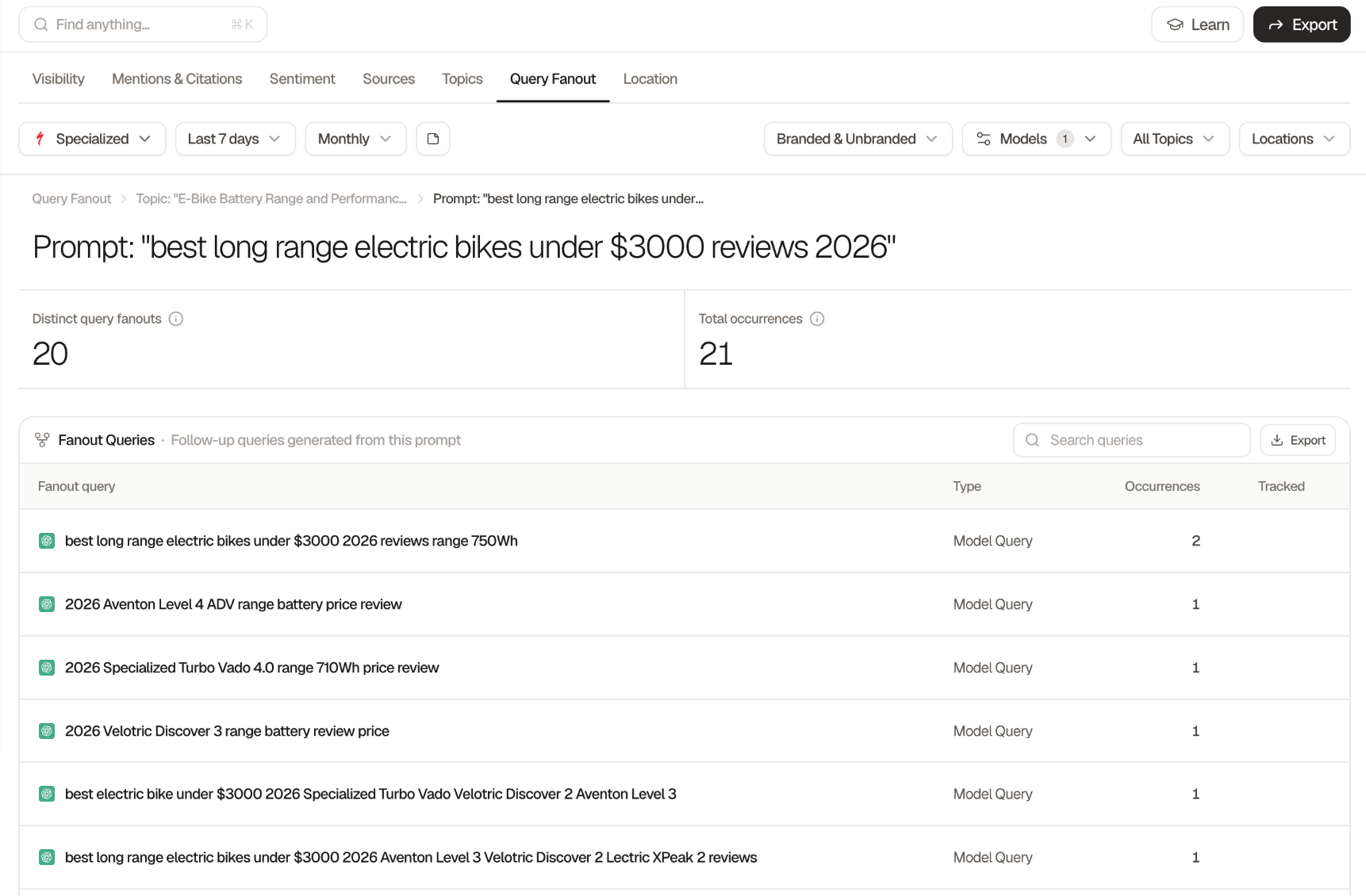
From here, you can add a sub-query to your list of tracked prompts by clicking the “Track” button. You can then access it in the “Your Prompts” section and dig deeper into your brand’s visibility for that prompt. This lets you see how you’re performing across different engines and compare progress against your competitors.
Optimizing for query fan-out starts with the right questions and tools
Start by picking the most important commercial topics for your brand and mapping the question cluster around each one. Make sure to answer all modifier angles, including best, price, year, and review angles, with dedicated sections or pages.
Build presence on the third-party domains that answer engines check for your category and measure your brand’s presence on the sub-query level.
To get started measuring your brand’s AI visibility, begin a free trial of Searchable today.
Frequently asked questions
No, query expansion is a different retrieval technique which relies on broadening a query with synonyms and related terms. Query fan-out, on the other hand, generates multiple sub-queries with different intents and then synthesizes an answer from the combined results.

